> ## Documentation Index
> Fetch the complete documentation index at: https://docs.controller360.com.br/llms.txt
> Use this file to discover all available pages before exploring further.
# News and improvements
> Learn more about the latest Controller360 updates.
## StreamSync Hotfix v6.1.1
StreamSync Hotfix v6.1.1 fixes an issue in the API reconnection process after network instability.
### Reconnection Fix
In certain situations, StreamSync could not automatically restore the connection to the API after an interruption.
With this fix, the service now:
* Detects loss of communication;
* Attempts to restore the connection automatically;
* Resumes operation after temporary instability;
* Reduces the need for manual restarts.
### Hotfix Benefits
* Greater stability in API communication;
* Automatic recovery after temporary network failures;
* Fewer synchronization interruptions;
* Greater continuity in data processing.
### Hotfix Summary
StreamSync v6.1.1 improves the API reconnection mechanism, ensuring greater synchronization stability and continuity after network fluctuations.
[Original publication](https://controller360.com.br/?p=5459)
## API Hotfix v6.2.1
API Hotfix v6.2.1 fixes the behavior when editing the merchandising month in the Budget routine.
### Budget Fix
The API processing performed when editing the merchandising month of an existing budget has been adjusted.
With this fix:
* The period can be changed correctly;
* The update is saved and retained after a new query;
* Updated data is made available correctly to integrations;
* The budget editing process is more stable and reliable.
### Hotfix Benefits
* Correct operation when editing the merchandising month;
* Proper persistence of changes;
* Greater consistency in Budget data;
* Continuity for integrations that consume the API.
### Hotfix Summary
API v6.2.1 restores the correct operation of merchandising month editing, ensuring that changes made to the Budget are processed and stored correctly.
[Original publication](https://controller360.com.br/?p=5447)
## Portal Hotfix v6.2.1
**Portal Hotfix v6.2.1** was released to fix the **Live** feature located in the **Real-Time** module of the Controller 360 Portal.
The update improves the behavior of the **“Start”** button, ensures that the Live screen is displayed correctly at the end of the configured time, and prevents old information from remaining in the progress grid after the page is refreshed.
### Fixed Issue
An issue was identified in the Live initialization flow. When the specified time ended, the **“Start”** button did not correctly transition to the Live screen, interrupting the expected behavior of the feature.
In addition, the progress grid could continue displaying information from a previous operation after the screen was refreshed.
### Adjustments Made
* Fixed the behavior of the **“Start”** button.
* Adjusted the opening of the Live screen after the configured time ends.
* Implemented clearing of the progress grid after the page is refreshed.
* Fixed the transition between the processing state and the Live display.
* Improved the visual and functional consistency of the routine.
### Impact on Users
Users now have a more stable and predictable flow when using Live. When the configured time ends, the screen is displayed correctly and the progress grid does not retain data from previous operations.
### Recommended Validations
* Start an operation in Real-Time and wait for the configured time to end.
* Confirm that the Live screen opens correctly.
* Check the **“Start”** button before, during, and after processing.
* Refresh the page and confirm that the progress grid is cleared.
* Perform consecutive operations to verify that previous information does not remain.
* Perform a general validation in Real-Time to identify possible regressions.
### Benefits
* Greater stability when using Live.
* Better visual feedback during state changes.
* Removal of outdated information from the progress grid.
* Fewer failures during feature initialization.
* A clearer and more reliable real-time monitoring experience.
[Original publication](https://controller360.com.br/?p=5444)
## New Features in Portal v6.2.0
### Overview
**Portal v6.2.0** brings together new features, usability improvements, and important adjustments to the **Budget, Metrics, Commercial Monitoring, Statements, and Records** modules.
### Main New Features
#### Budget
* **Previous Month Revenue:** the **“Previous Month”** option was added to base revenue, allowing the consolidated value of the calendar month immediately before the budget period to be used.
* **Integrated Editing:** the editing flow was improved to ensure that changes made in the Portal are updated correctly in all related tables.
* **Greater Precision:** percentage fields now accept up to **four decimal places**, providing more accurate calculations.
#### Metrics and Commercial Monitoring
* **Purchases vs. Sales:** the name and display order previously shown as “Sales vs. Purchases” were changed.
* **Comparative Summary:** the analysis now displays **Total Purchases, Total Sales, Difference**, and **Actual Percentage in Relation to Budgeted**.
* **Consolidated Cards:** the main indicators were combined with their respective accumulated balances, making the dashboard easier to read.
* **Previous Month Comparison:** a new option was added to compare indicators with the immediately preceding month.
* **Expense Calculation:** a parameter was created to define whether expenses are calculated by **Issue Date** or **Due Date**, considering the individual value of each installment.
#### Parameters and Records
* The new **identification parameter 43** was added.
* The behavior of the parameter related to identifying the head office store was improved.
* The **Layout** field can now be changed to **“Both”** in the Chart of Accounts Group record.
* The **Document Number** fields were adapted to support the new alphanumeric CNPJ format.
#### Financial and Statements
* The financial information import process was improved.
* Check receipt imports were separated from other cash movements.
* Alphabetical ordering was applied to the analytical accounts in the Managerial and Financial Statements.
* Open documents can now be displayed for simultaneous generation of Managerial Statements.
* The handling of issue and due dates used in expense calculation was adjusted.
#### Usability and Navigation
* **Proximity Search:** grid filters were improved to locate records using approximate matches.
* **Context Preservation:** after adding or editing a Chart of Accounts, the Portal retains the previously used page, filters, and sorting.
* **Filter Persistence:** configured filters are now retained while navigating between Analytics reports.
* **Frequently Asked Questions:** links to the documentation were fixed on the current screens.
#### Integrations and Administration
* **Feed Administrator:** a specific profile was created for moderating the News Feed, allowing authorized users to delete posts and comments.
* **Technical Compatibility:** the packages and libraries required to ensure Portal compatibility with the Controller 360 ecosystem were updated.
### Release Benefits
**Portal v6.2.0** provides greater calculation accuracy, improves information integration, and simplifies recurring activities. The new features make budgeting, indicator analysis, statement generation, and system administration faster, safer, and more efficient.
[Original publication](https://controller360.com.br/?p=5439)
## New Features in API360 v6.2.0
**API v6.2.0** brings together new features and improvements focused on performance, information consistency, and integration between the **Controller 360 Portal, Application, and Archon**.
The update also expands the capabilities of the **Metrics, Budget, Statements, and News Feed** modules, while improving data synchronization and import processes.
### Main Deliveries
#### Metrics and Analytics
* **Purchases vs. Sales:** the concept previously presented as “Sales vs. Purchases” was changed. The analysis now displays **Total Purchases, Total Sales, Difference**, and **Actual Percentage in Relation to Budgeted**.
* **Expense Calculation:** a parameter was created to define whether expenses are calculated by **Issue Date** or **Due Date**.
* **Installment Amount:** expense calculations now consider the individual amount of each installment instead of the total document amount.
* **Purchase Limit:** the export was adjusted to display consolidated data from the upper analysis level.
#### Budget
* **Previous Month Revenue:** the **“Previous Month”** option was added to the base revenue field, allowing the consolidated value of the calendar month immediately before the budget period to be used.
* **Change Synchronization:** the editing flow was reviewed to ensure that changes made in the Portal are persisted in the API and updated correctly in all related tables.
#### Controls and Governance
* **Feed Administrator:** a specific permission was created for News Feed moderation, allowing authorized users to delete any post or comment.
* **Account Sorting:** the analytical accounts in the Managerial and Financial Statements are now displayed in alphabetical order.
#### Integrations and Data
* **Archon Integration:** synchronization of the **Notes** field was added to Company and Store records.
* **Financial Import:** identification of the head office store was optimized, eliminating dependence on parameter 18 and querying the record directly.
* **Check Receipts:** the standard movement type **“Check Receipt”** was created for the data input import routine.
#### Navigation and Productivity
* **Filter Preservation:** the Chart of Accounts grid now retains the page, filters, and sorting used after a record is added or edited.
* **Batch Generation:** the Managerial Statement now allows multiple open documents to be selected and generated simultaneously.
#### Technical Updates
* Updated **StreamSync** packages and libraries for compatibility with version 6.1.0.
* Updated project dependencies to align with the new Portal version.
### Release Benefits
API v6.2.0 provides greater reliability in data calculation, improves integration between platforms, and reduces manual operations. The release also expands Feed governance, makes budgeting and statement processes more efficient, and provides smoother navigation through Controller 360 routines.
[Original publication](https://controller360.com.br/?p=5436)
## Mobile Hotfix v6.3.2
Mobile Hotfix v6.3.2 includes **2 fixes**, focusing on the internationalization of monetary values and the accuracy of Purchase Limit calculations.
### Monetary Value Formatting
The display of monetary values was fixed according to the language selected in the application.
With this adjustment, values now correctly follow the configured regional format, including:
* Currency symbol;
* Decimal separators;
* Thousands separators;
* Formatting corresponding to the selected language.
### Purchase Limit
The calculations for adjustments and value distribution at **merchandising level 2** were fixed.
The fix ensures:
* Proper distribution of values;
* Correct application of adjustments;
* Greater calculation accuracy;
* Consistency of the information displayed in the application.
### Hotfix Benefits
* Monetary values displayed in the correct format;
* A better experience for users of different languages;
* Greater accuracy in the Purchase Limit;
* Greater reliability in distribution by merchandising level.
### Hotfix Summary
Mobile v6.3.2 fixes monetary value formatting according to the selected language and improves Purchase Limit adjustment and distribution calculations for merchandising level 2.
[Original publication](https://controller360.com.br/?p=5433)
## Portal Hotfix v6.1.5
Portal Hotfix v6.1.5 includes **4 fixes**, focusing on information reliability and the proper operation of Portal filters.
### Real-Time — Sales by Hour
The values displayed in the **Sales by Hour** chart tooltip, which were shown in reverse, have been fixed.
With this adjustment, each time slot now displays the corresponding information correctly.
### Statement Filter
The store filter in the Statements, which displayed an inactive store and duplicated one of the available stores, has been fixed.
The filter now displays only active stores, without duplicate records.
### Data Entry
The information relating to the **date type**, which was displayed in reverse in the Data Entry routine, has been fixed.
### Purchase Limit
The Purchase Limit screen filter update was adjusted, ensuring that information is reloaded correctly after parameters are changed.
### Hotfix Benefits
* Greater reliability of Real-Time information;
* Correct display of stores in Statements;
* Correct information in Data Entry;
* Better operation of Purchase Limit filters;
* Fewer inconsistencies during analyses.
### Hotfix Summary
Portal v6.1.5 fixes inconsistencies in data presentation and filters in the Real-Time, Statements, Data Entry, and Purchase Limit routines, providing a more reliable and stable experience.
[Original publication](https://controller360.com.br/?p=5431)
## Portal Hotfix v6.1.4
Portal Hotfix v6.1.4 includes **2 fixes**, focusing on occurrence display and the stability of the Portal's real-time communication.
### Occurrence Display
The display of occurrences in the **Verify** function has been fixed, ensuring that information is loaded and displayed correctly for the user.
With this adjustment:
* Occurrences are visible again;
* Information verification is clearer;
* The routine displays complete and reliable data.
### Connection Stability
A behavior that kept the real-time connection active indefinitely has been removed.
The fix improves connection termination and management, avoiding unnecessary resource consumption and possible impacts on Portal performance.
### Hotfix Benefits
* Correct display of occurrences;
* Greater reliability during verification;
* Better connection management;
* Reduced unnecessary resource consumption;
* Greater Portal stability and performance.
### Hotfix Summary
Portal v6.1.4 fixes occurrence display in the **Verify** function and improves real-time connection management, providing a more stable and reliable experience.
[Original publication](https://controller360.com.br/?p=5428)
## API Hotfix v6.1.5
API Hotfix v6.1.5 fixes an issue in Merchandising Sector records, ensuring that the hierarchical structure is preserved when the status is changed.
### Merchandising Sector
Previously, when the status of a merchandising sector was changed, its hierarchy was reset, affecting the organization and relationships of the registered structure.
With this fix:
* The hierarchy remains preserved after the status is changed;
* Merchandising levels retain their relationships;
* The registered structure remains correctly organized;
* Routines that use merchandising sectors receive consistent information.
### Benefits of the Fix
* Preservation of the merchandising hierarchy;
* Greater safety when updating records;
* Fewer inconsistencies between levels;
* Continuity of analyses by merchandising sector.
### Hotfix Summary
API v6.1.5 prevents the Merchandising Sector hierarchy from being reset when its status is changed, ensuring the integrity of the registered structure and relationships.
[Original publication](https://controller360.com.br/?p=5426)
## API Hotfix v6.1.4
API Hotfix v6.1.4 fixes the submission of the Contribution Margin when exporting the Budget.
### Budget Export
An issue in which the margin was not sent with the other information during export has been fixed.
After this adjustment, the export now:
* Sends the calculated margin correctly;
* Maintains consistency with Budget data;
* Displays complete information at the export destination;
* Prevents incomplete or inconsistent analyses.
### Benefits of the Fix
* Complete information export;
* Greater data reliability;
* Consistency between the Budget and exported data;
* Greater confidence when analyzing the Contribution Margin.
### Hotfix Summary
API v6.1.4 restores margin submission in the Budget export, ensuring complete and consistent information for analysis.
[Original publication](https://controller360.com.br/?p=5424)
## API Hotfix v6.1.3
API Hotfix v6.1.3 includes 6 fixes, focusing on indicator consistency, Budget calculations, and the accuracy of commercial analyses.
### Contribution Margin
The discrepancy in the Contribution Margin percentage displayed between the following routines has been fixed:
* Budget;
* Metrics;
* Commercial Monitoring.
With this adjustment, the routines now use consistent information, preventing differences in how the indicator is interpreted.
### Expense Limit
The basis used to calculate the Expense Limit has been corrected, ensuring greater accuracy in the displayed values and financial planning monitoring.
### Analysis by Buyer and Merchandising Category
The sales amount displayed in the details by **Buyer and Merchandising Category** has been corrected for clients configured at level 2.
The analysis now correctly considers the merchandising structure defined for the client.
### Margin and Cost by Store
Budget margin and cost calculations were adjusted to correctly respect the relationship between the store and merchandising sector.
### Calculation with Zero COGS
The margin adjustment calculation has been fixed for situations in which COGS is zero, preventing incorrect results or inconsistencies during Budget processing.
### Calculation by Store Group
The Budget calculation by store group has been fixed to process each store's information individually, ensuring that values are calculated in the correct context.
### Hotfix Benefits
* Greater consistency between indicators;
* More accurate budget calculations;
* Correct analyses by store and merchandising category;
* Reliable results in scenarios with zero COGS;
* Better calculations for store groups.
### Release Summary
API v6.1.3 improves the reliability of calculations and indicators used by Platform360, correcting discrepancies in margin, expense limits, and Budget processing across different store and merchandising sector configurations.
[Original publication](https://controller360.com.br/?p=5421)
## Portal Hotfix v6.1.3
Portal Hotfix v6.1.3 fixes the behavior of the filter used to create and calculate the Budget.
### Budget Fix
An inconsistency in the Budget routine filter that could prevent or compromise information creation and calculation has been fixed.
After this adjustment, the Portal now:
* Applies the selected filters correctly;
* Considers the correct context during calculation;
* Generates the Budget using the information corresponding to the selection;
* Maintains greater consistency in the displayed values.
### Benefits of the Fix
* Greater reliability in Budget calculations;
* Fewer inconsistencies in values;
* Correct filter operation;
* Continuity of the budget planning process.
### Hotfix Summary
Portal v6.1.3 restores the correct operation of filters when creating and calculating the Budget, ensuring greater accuracy and reliability in the generated information.
[Original publication](https://controller360.com.br/?p=5419)
## Portal Hotfix v6.1.2
This release includes **5 fixes**, focusing on exporting reports to Excel and making imports from previous periods more flexible.
### Excel Export Improvements
#### Exported Reports
Formulas and technical information that should not have been displayed in exported files have been removed.
With this adjustment, spreadsheets are clearer, better organized, and more suitable for analysis and sharing.
#### Financial Flow
The export of the **Detail Outflows** option has been fixed, ensuring that the information is generated correctly in the Excel file.
#### Product Analysis
The Product Analysis export received fixes to:
* Report name;
* Information identification;
* Displayed totals;
* Organization of exported data.
#### Inventory — Loss and Breakage
The totals in the Inventory Analysis — Loss and Breakage export have been fixed, ensuring greater consistency between the data displayed in the Portal and Excel.
### Importing Previous Periods
Information from previous months can now be imported even when later periods have already been closed.
This improvement provides greater flexibility for making retroactive corrections, adjustments, or imports without reopening later accounting periods.
### Release Benefits
* Clearer and more reliable Excel files;
* Correctly displayed totals;
* Greater consistency between the Portal and exported files;
* Correct details for financial outflows;
* Greater flexibility for retroactive imports.
### Release Summary
This release improves the quality of Excel exports across different Portal reports and allows previous months to be imported even when later periods have been closed.
[Original publication](https://controller360.com.br/?p=5416)
## Mobile Hotfix v6.3.1
This fix restores the **Generate** button in the Purchase Limit routine, allowing planned limits to be calculated and displayed correctly in the application.
[Original publication](https://controller360.com.br/?p=5414)
## API Hotfix v6.1.2
API Hotfix v6.1.2 improves communication stability between the API and the ERP database, reducing failures caused by response timeouts.
### Improved Communication with the ERP
The timeout for responses from the ERP database has been increased from **5 to 60 seconds**.
This change allows the API to wait for longer-running operations before interrupting processing, especially in high-volume scenarios or when the integration is slow.
### Benefits of the Fix
* Fewer response timeout errors;
* Greater stability in ERP-integrated operations;
* Better tolerance for performance fluctuations;
* Lower risk of premature interruptions;
* Greater continuity in information processing.
### Note
When the ERP is unavailable or slow, some requests may wait longer before returning an error. This behavior is expected after the adjustment.
### Hotfix Summary
API v6.1.2 increases the timeout for ERP responses, providing a more stable integration and reducing failures caused by slow communication.
[Original publication](https://controller360.com.br/?p=5412)
## Portal Hotfix v6.1.1
Portal Hotfix v6.1.1 fixes column display issues in Commercial Monitoring, ensuring a more complete and reliable reading of the information.
### Commercial Monitoring Fix
With some filter combinations, certain important columns were not displayed on the screen.
With this fix, the following columns:
* Loss;
* Breakage;
* Consumption.
are displayed correctly again when using the **Store and Merchandising Sector** filters.
### Benefits of the Fix
* Complete view of indicators;
* Greater reliability when reading data;
* Fewer questions about apparently missing information;
* Greater confidence during operational analyses;
* Retention of the context selected in the filters.
### Hotfix Summary
Portal v6.1.1 restores the display of the loss, breakage, and consumption columns in Commercial Monitoring, preventing incomplete analyses and improving the reliability of the information presented.
[Original publication](https://controller360.com.br/?p=5410)
## API Hotfix v6.1.1
API Hotfix v6.1.1 fixes a critical issue in cost center allocation in the Managerial Data Entry routine.
### Cost Center Allocation Fix
The query and formula used to calculate the allocation have been adjusted.
The fix ensures:
* Correct distribution of values between cost centers;
* Consistent results in Managerial Data Entry;
* Greater reliability of information used in Results Calculation.
### Deliveries Completed in the Same Cycle
In addition to the hotfix, the API received the following improvements:
* Batch synchronization for large data volumes;
* Support for comparative Managerial and Financial Income Statement reports;
* Improvements to error monitoring and handling;
* New validations in user records;
* Optimization of Budget queries.
### Hotfix Summary
API v6.1.1 increases the accuracy of cost center allocation and improves the reliability of managerial data.
[Original publication](https://controller360.com.br/?p=5408)
## API Hotfix v6.1.0
API Release v6.1.0 strengthens technical monitoring, improves the performance of high-volume integrations, and supports the new comparative Results Calculation reports.
### Monitoring and Traceability
Global exception handling has been implemented to centralize and standardize API error responses.
Improvements include:
* Integration with Azure Application Insights through OpenTelemetry;
* Generation of a unique `errorId` for each failure;
* Easier location of errors in internal logs;
* Removal of technical information from responses displayed to users;
* Greater security and faster support response.
### Batch Synchronization
Integrations for the following records can now be performed in batches:
* People;
* Movement Types;
* Merchandising Sectors.
This change improves synchronization performance with the ERP, especially for clients with large volumes of information.
### User Validation
New validation rules have been added for usernames, ensuring greater integrity of stored information and preventing invalid records.
### Support for Comparative Reports
The API has been updated to support the new horizontal reports:
* Comparative Managerial Income Statement;
* Comparative Financial Income Statement.
The new features allow dynamic comparisons:
* Between months;
* Between years;
* Between different stores;
* Using combinations of periods and stores.
### Budget Query Optimization
The merchandising sector level has been removed from Budget queries, simplifying the returned information and improving loading speed.
### Integration Ecosystem Improvements
Improvements related to the Archon APIs have also been completed.
#### CNPJ Query
Handling of the `429 — Too Many Requests` error has been implemented for Brasil API queries, reducing failures and preventing information loss during registration.
#### Municipality Autofill
In project creation routines, the municipality can now be filled in automatically based on the entered postal code, speeding up registration and reducing typing errors.
### Release Summary
API v6.1.0 provides greater stability, security, and traceability for the Platform360 ecosystem. The release also improves high-volume integrations, optimizes queries, and provides the structure required for the Portal's new comparative reports.
[Original publication](https://controller360.com.br/?p=5405)
## New Features in Version 6.1.0 \[Portal]
Portal Release v6.1.0 introduces new comparative reports for Results Calculation, statement exports to Excel, Help Center improvements, and important navigation and usability fixes.
### New Comparative Reports
New horizontal versions of the following reports have been developed:
* Comparative Managerial Income Statement;
* Comparative Financial Income Statement.
The new reports allow comparisons:
* Between consecutive months;
* Between different years;
* Between stores displayed side by side;
* Using combinations of periods and stores.
A dynamic preview has also been added, displaying the report structure and updating as filters are selected.
The reports now display:
* Total actual amount;
* % V.A. — Vertical Analysis;
* % H.A. — Horizontal Analysis.
### Export to Excel
The Managerial and Financial Statements now include the **Export to Excel** option.
The exported file:
* Preserves the chart of accounts hierarchy;
* Respects the applied filters;
* Considers the **Hide Zero Values** option;
* Makes analysis and sharing outside the Portal easier.
### Greater Error Traceability
Exception responses now include an `errorId`, allowing errors to be located more quickly in internal logs and speeding up technical support.
### Updated Help Center
Access to the Help Center has been updated, and new support documents are now available directly in the Portal, making it easier for users to consult instructions.
### Real-Time Fixes
Issues related to access permissions have been fixed:
* Users with permission only for **Finalizing POS** can now view the screen correctly;
* The vertical scroll bar is once again displayed for users who only have **Real-Time** permission.
### Budget Screen Fix
The data grid no longer overlaps the side menu on the Budget screen, ensuring better visibility and navigation.
### Layout Adjustments
General interface refinements have also been made to maintain visual consistency and improve the Portal user experience.
### Release Summary
Portal v6.1.0 strengthens the comparative analysis of Results Calculation, makes exporting information easier, and improves access to documentation. This release also fixes important issues in Real-Time and the Budget interface.
[Original publication](https://controller360.com.br/?p=5403)
## New Features in Version 6.3.0 \[Application]
Mobile Release v6.3.0 expands the analyses available in the application, improves indicator interpretation, and fixes the behavior of period filters.
### **Supplier Analysis**
The application now includes a new supplier analysis, allowing managerial information and indicators to be monitored directly from a mobile device.
### **Inventory Analysis — Loss and Breakage**
A new analysis for monitoring inventory losses and breakages has been added.
New features include:
* Comparison of actual results with the configured KPI;
* Visual indicators using colors and arrows;
* Details by merchandising category;
* Sales, loss, breakage, and horizontal analysis information;
* Data updates according to the selected period, store, or merchandising category.
> For losses and breakages, results above the KPI represent a negative condition and are visually highlighted.
### **Fixed Period Filter**
The Metrics report filter has been adjusted to:
* Allow the selection of a single day;
* Consider all dates within a range;
* Display days in chronological order;
* Retain the selected period when switching between indicators and views;
* Correctly update cards, charts, totals, and headers.
### **Reorganized Side Menu**
The order of the side menu options has been updated to make navigation easier:
1. Home
2. Notifications
3. Activate Company
4. Controller-Docs
5. Online Support
6. Training Videos
### **Greater Error Traceability**
Exception responses now include an `errorId`, allowing the reported error to be identified and speeding up analysis by technical support.
### Release Summary
Mobile v6.3.0 delivers a more complete analytical experience, with new views of suppliers, losses, and breakages, better KPI interpretation, and greater reliability in period-based queries.
[Original publication](https://controller360.com.br/?p=5399)
## API Hotfix v6.0.14
#### API Hotfix – Budget
* **Previous Period Calculation:** the number of days considered in the budget calculation has been fixed. The Previous Period now uses exactly the same number of days as the selected period, preventing calculations with excess days and ensuring more accurate results.
[Original publication](https://controller360.com.br/?p=5343)
## Portal Hotfix v6.0.10
**Portal Stability:** an intermittent failure that could prevent or delay Portal loading has been fixed, providing users with more stable and reliable access.
[Original publication](https://controller360.com.br/?p=5341)
## New Features in Version 6.2.0 \[Application]
**3 New Analytics Reports for the \[App]**
Reports from **Controller 360 Portal Analytics** are now also available in the application, retaining the same depth of information and analytical capabilities in the mobile experience.
This release includes:
* **Product Analysis:** a complete report for monitoring and comparing product performance, identifying variations, trends, and items that require attention.

* **Promotion Analysis:** allows users to evaluate the performance of promoted products and monitor their impact on operational results.

* **Purchase Analysis:** provides indicators for analyzing completed purchases and their relationship with sales, inventory, and results.

* **Filter Persistence:** configured filters are retained while navigating between Analytics reports, avoiding repeated entry and making analysis faster.
* **Notification Configuration:** the development and staging environments were adjusted to ensure that application notifications work correctly.
With this release, managers can access the Portal's main analyses directly from their mobile devices, with complete information, smart filters, and greater agility to make decisions from anywhere.
[Original publication](https://controller360.com.br/?p=5328)
## API Hotfix v6.0.13
**Budget:** an error in the calculation when selecting a specific store and month has been fixed, ensuring that values are processed and displayed correctly.
[Original publication](https://controller360.com.br/?p=5326)
## Portal Hotfix v6.0.09
This Hotfix includes the following fix:
* **Statements:** fixed an issue that prevented the PDF print preview from being displayed.
This adjustment restores the generation and display of PDF statements, allowing users to view and print documents normally.
[Original publication](https://controller360.com.br/?p=5324)
## API Hotfix v6.0.12
**API Hotfix v6.0.12** includes two important fixes:
* **Financial Statement:** fixed the **Vertical Analysis (V.A.)** calculation, which was not running correctly.
* **Budget:** fixed the error displayed when calculating values for a specific store and month.
These adjustments increase calculation accuracy and the reliability of information processed by the API.
[Original publication](https://controller360.com.br/?p=5156)
## Portal Hotfix v6.0.8
**Portal Hotfix v6.0.8** was released with four important fixes for Controller 360.
* **Financial Flow:** fixed the display of the date type description.
* **Statements:** fixed the PDF print preview.
* **Managerial and Financial Statements:** adjusted the formatting of the **% V.A.** column.
* **Analytics – Purchases:** fixed the error displayed in the grid component.
These adjustments provide greater stability, clearer information, and better operation of Portal routines.
[Original publication](https://controller360.com.br/?p=5149)
## New Features in Version 6.0 \[Application]
🚀 The **Controller 360 Application** has been completely reinvented.
Version 6.0 represents the greatest evolution ever made to the Controller 360 App.
Nearly every module has been redesigned with a new visual identity,
more intuitive navigation, smart filters, new analyses, and unprecedented features that
bring the mobile experience fully in line with the Web platform.
All the intelligence of the Controller 360 Portal is now available in the palm of your hand,
allowing managers to monitor indicators, create plans, analyze
results, and make decisions from anywhere.
### **✨ New Design and New Experience**
The entire application interface has been redesigned.
The new layout provides:
● A modern and more intuitive interface;
● Better use of information;
● Simplified navigation;
● New visual components;
● Faster access to indicators;
● A standardized experience with the Controller 360 Portal.
### **Completely Redesigned Real Time**
The Real Time module has been completely redesigned.
In addition to the new visual design, it now provides nearly all the strategic information from the
Portal in real time.
Highlights
● New indicator dashboard.
● Sales vs. Target.
● Contribution vs. Target.
● Average Ticket.
● Number of Receipts.
● Promotional Sales.
● New Identified Sales Card.
● Contribution Margin %.
New Features
● Multi-Store Filter.
● Dynamic filters between Store and Merchandising Category.
● Instant switching between Sales and Contribution views.
● Comparison between stores.
● Comparison by merchandising category.
● New real-time merchandising analysis.
● New Sales by Hour chart, allowing users to monitor the complete evolution of
sales throughout the day.
● New view of POS receipts, with charts and complete details
of payment methods.
The result is much more complete and dynamic operational monitoring
### **📈 Unified Metrics + Commercial Monitoring**
One of the release's biggest new features.
The Metrics and Commercial Monitoring modules have been integrated into a single screen.
The application now provides nearly the full analytical experience of the Controller
360 Portal.
New Features
● Completely redesigned interface.
● New smart filters.
● Dynamic navigation.
● Comparisons by Store.
● Comparisons by Merchandising Category.
● Commercial indicators.
● Financial indicators.
● Margins.
● Purchases.
● Expenses.
● Average Ticket.
● Projected Result.
● DDV.
● Inventory Variation.
● Losses, Breakages, and Consumption.
● Receipts vs. Payments.
● Sales, Contribution, and Purchases by Merchandising Category.
All in a single navigation experience.
### **🤖 Artificial Intelligence**
The Metrics module now includes Artificial Intelligence capabilities, providing
support for interpreting indicators and helping identify opportunities,
deviations, and operational points that require attention.
AI makes analyses smarter and accelerates decision-making.
### **💰 Completely Redesigned Purchase Limit**
Purchase Limit planning has been completely redesigned for mobile
devices.
The entire plan can now be created directly in the application.
New Features
● Complete Upper-Level planning.
● Complete Lower-Level planning.
● Individual adjustment by merchandising category/sector.
● Editing of Inventory values by sector.
● Editing of Purchase Orders by sector.
● Automatic recalculation of the Ideal Limit during planning.
● History of plans created in the application.
● Full compatibility with Controller 360 Portal v6.0.
● View of Upper and Lower limit fluctuations.
Planning is now much more accurate and flexible.
### **💵 Redesigned Financial Flow**
The Financial Flow module has been fully adapted for the mobile experience.
All the depth of information available in the Portal can now be viewed directly
in the application, while retaining the same level of detail and analytical capability.
### **📊 Analytics in the Application**
**Version 6.0 also adds the Analytics module to the application, providing complete comparative reports to support commercial and operational decisions.**
Available reports:
● **Analysis by Store and Merchandising Category:** allows performance to be compared between two periods. The user configures the Current Period and Previous Period, and the application presents a complete report with the main indicators for stores and merchandising categories.
All reports have smart filters and navigation adapted to the mobile experience, making analyses faster, more practical, and more accessible.
### **✅ Tasks and Task Board**
Task management has been completely redesigned.
New Features
● New Task Board.
● Modern interface.
● Full editing through the application.
● Integration with the News Feed.
● Real-time activity monitoring.
### **⚙️ Settings**
The Settings screen has been redesigned.
It now provides much more complete management of environments, indicators, and stores,
while maintaining the visual standard of version 6.0.
### **🔐 New Login Screen**
The authentication process has been completely redesigned.
In addition to the new layout, the release allows:
● Company activation directly through the application.
● Individual remote support for clients.
● Greater convenience during implementation.
### **🔔 Notifications**
The Notifications module has been redesigned and standardized with the Controller
360 Portal experience.
The new interface provides a more organized, modern, and efficient view of
system communications.
**🎯 Main Benefits**
✔ Completely redesigned application.
✔ New visual identity.
✔ Unified Portal and Mobile experience.
✔ Greater speed and usability.
✔ Real-time monitoring.
✔ Complete purchase planning from a mobile device.
✔ Fully adapted Financial Flow.
✔ Unified Commercial Monitoring and Metrics.
✔ Artificial Intelligence capabilities.
✔ New smart filters.
✔ More analyses available in the application.
✔ Complete operation management in the palm of your hand.
[Original publication](https://controller360.com.br/?p=5142)
## New Features in Version 6.0 \[Portal]
**Controller 360 version 6.0** represents the platform's greatest evolution, introducing an extensive visual redesign, usability improvements, new analytical capabilities, and important advances in the **Controllership, Analytics, Results Calculation, and Settings** modules.
A major highlight of this release is the integration of Artificial Intelligence into Metrics reports. With a single click, AI transforms data into strategic insights, identifies trends, highlights deviations, points out opportunities for improvement, and generates interpretations that make analysis faster, smarter, and more efficient, supporting managers' decision-making.

### **Home Screen**
Completely redesigned menus.
● Search field available on the Home page and other screens.
● Redesigned Feed with visual and navigation improvements.
● New View More feature for expanding long messages.
● Improvements to the HTML editor used for Feed posts.

● Support for Dark Mode and Light Mode.

### **Notifications**
New, smoother, and more dynamic visual design.
● Quick filters for Today, 7, 15, and 30 days.
● Option to display only unread notifications.
● Individual read marking.
● Access through Home notifications or the bell icon.

### **Tasks**
● Visual improvements to boards.
● Smoother navigation.
● New text editor for composing tasks.
### **Controllership**
### **Real Time**
● New layout.
● New Identified Sales card, integrated with the Loyalty Club.
● Improvements to Sales by Hour analysis, including:
○ Best Hour
○ Weakest Hour
○ Hourly Average

### **Budget (Strategic Planning)**
● Completely redesigned module.
● New toolbar.
● Visual identification of stores that have already been planned.
● New Base Month Revenue field:
○ Previous Year
○ Previous Period
● Planning calculation improvements:
○ Base Month Calculation
○ Average Months
● New merchandising category selector with simplified selection.

● Expanded from 7 to 30 indicator columns, as shown in the image below;

### **Edit Month**
● Replaced the Change function with Edit Month.
● Added 19 new indicators.

### **Edit Day/Month**
● Added the following columns:
○ Number of Receipts
○ Average Ticket
● Editing by values and shares.
● New automatic redistribution feature (Magic Wand).

### **Edit Days or Month/Merchandising Category**
● New toolbar.
● Editing by lower levels.
● Added the Expenses column.
● Automatic redistribution using the Magic Wand.

### **Commercial Monitoring**
● New toolbar.
● Improved selectors.
● Added the Expenses column.
● Improvements to the following analyses:
○ Average Ticket
○ Receipts
○ Inventory
○ Loss
○ Breakage
○ Consumption

● New columns in Purchase analysis.

● Analyses by upper and lower level.

### **Purchase Limit**
● Completely redesigned module.
● New Create Purchase Plan feature.
● Complete planning history:
○ Created
○ Completed
○ Exported

● Editing during creation.
● Individual control by sector and lower level.
● New monitoring of purchase limit fluctuations.

### **Financial Flow**
● Toolbar improvements.
● Better document viewing.
● Added daily financial forecasts.
### **Metrics**
● New toolbar.
● New selectors.
● New Expenses card.
● Improvements to charts and analyses by sector.
● New participation charts for:
○ Sales
○ Contribution
○ Purchases


### **Analytics**
**General Improvements**
● Better performance.
● Faster navigation.
● Redesigned selectors.
● Simultaneous selection of multiple sectors and subsectors.

### **Purchase Analysis**
● New reference indicator for Purchases vs. Sales.
● New DDV indicator.

### **Results Calculation**
### Data Entry
● Better visual organization.
● Use of colors to make information easier to identify.
**Occurrences**
● Occurrences no longer prevent reports from being closed.
● Detailed review of identified inconsistencies.

### Data Import
● New store selection experience.
● Visual identification of stores that have already been imported.
● Easier import process.

### **Settings**
### Stores
● New visual design.

● Improved store editing.

### **Account Group**
● Terminology change:
○ Analytical → Aggregator


### Chart of Accounts
● New layout.
● Better performance.


### Integrate Chart of Accounts
● New screen for integrations and relationships.
● Combined view of Movement Types.

### Person
● New supplier management screen.
● Manual synchronization.
● Record deactivation.

### Movement Type
● New simplified view of VR Master movements.

### Merchandising Sector
● Added the Hierarchy column.
● Visual expansion of the sector structure.

### Indicators
● 22 redesigned cards.


### Indicators by Store
● 22 editable columns.
● Added the Number of SKUs column.

### Indicators by Merchandising Category
● 22 editable columns.
● Added the Number of SKUs column.
● Configuration by upper and lower levels.
### Users and Permissions
● New form layout.
● Improved store and merchandising category selectors.

### Parameters
● Expanded to 39 configurable parameters.
● New detailed view.
The **Parameters** screen was completely redesigned in version 6.0, providing a more organized and intuitive interface. Parameters are now presented more descriptively, identifying the **System**, **Group**, and **Value**, along with new search and filtering features. The result is simpler navigation, making it easier to locate and configure system parameters.


### Activity Log
● Replaces the former Transaction Log.
● Displays:
○ User
○ Action
○ Routine
○ ID
The **Activity Log** received a new layout in version 6.0, with a more modern and organized interface. In addition to the visual update, the routine now has more practical filters and more detailed information, making it easier to monitor user actions and making audits and queries much faster and more intuitive.


[Original publication](https://controller360.com.br/?p=5067)
## New Features in Version 5.3
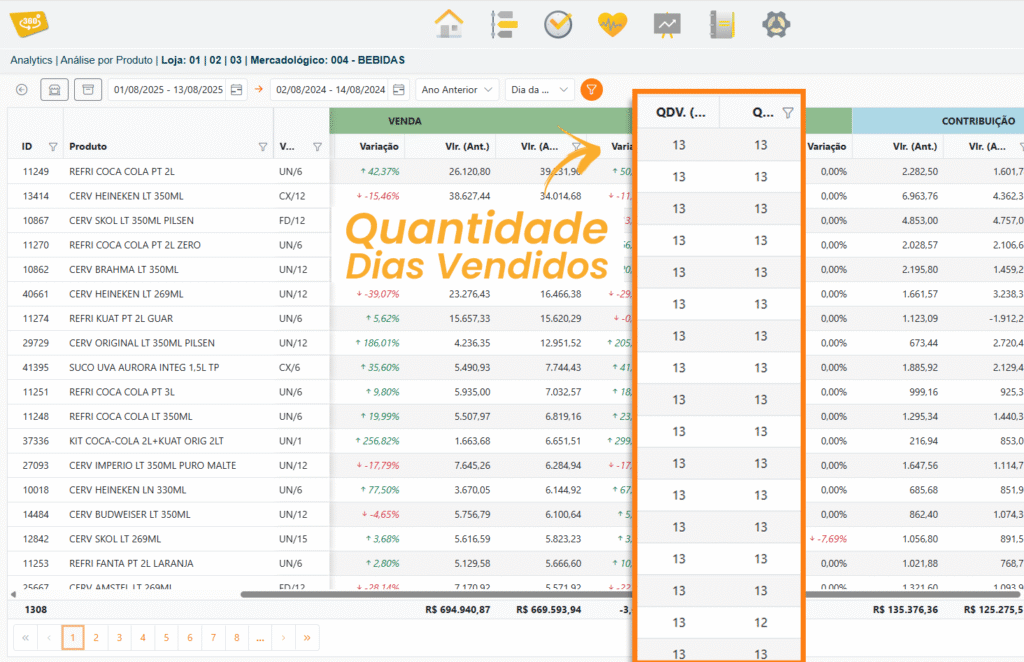
### **PRODUCT ANALYSIS – NEW QDV COLUMN**
1. A new column named **QDV** has been added under **Analytics > Product Analysis**, displaying the “number of days sold.”
Example: within a 30-day filter, the product was sold on 20 days. Total Sales and Contribution Variation.
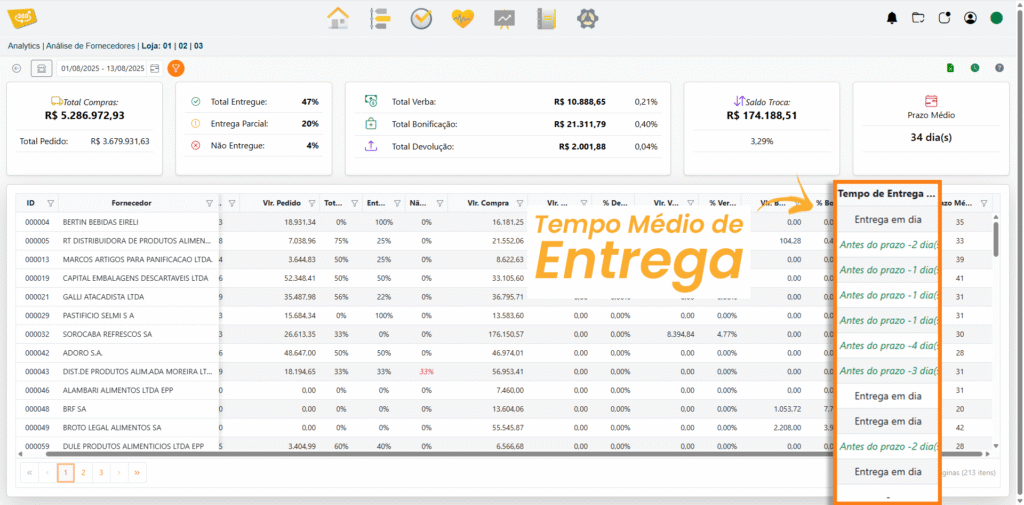
### **NEW ADJUSTMENT IN SUPPLIER ANALYSIS**
\[Analytics] – Adjusted the Supplier Analysis field from Delivery Time to **Average Delivery Time.**
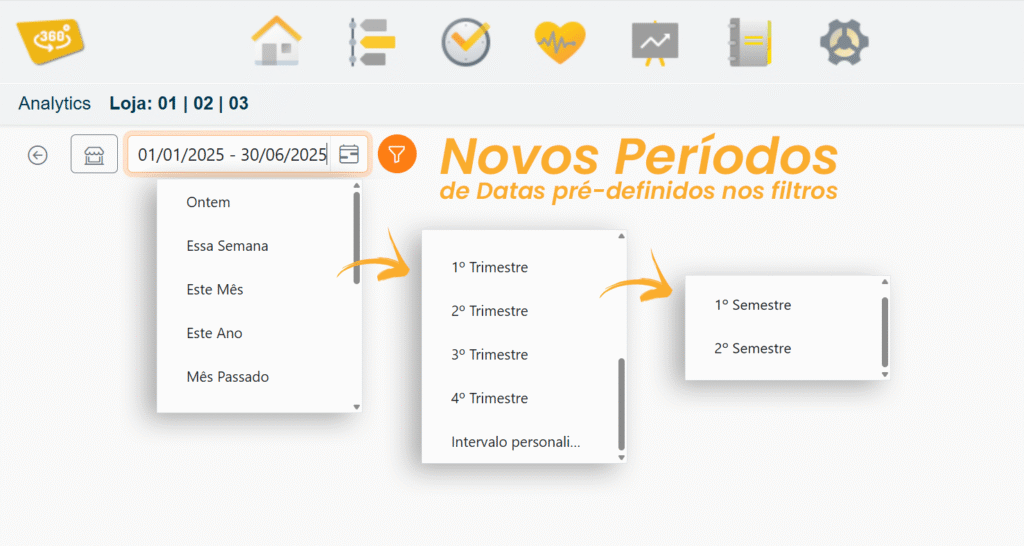
### **NEW PREDEFINED DATE FILTERS**
**New predefined date periods have been added to the filters** in Analytics.
The following filters can now be selected: **1st Half, 2nd Half, 1st Quarter, 2nd Quarter, 3rd Quarter, and 4th Quarter.**
### **NEW INTERNAL TRANSFER PARAMETER**
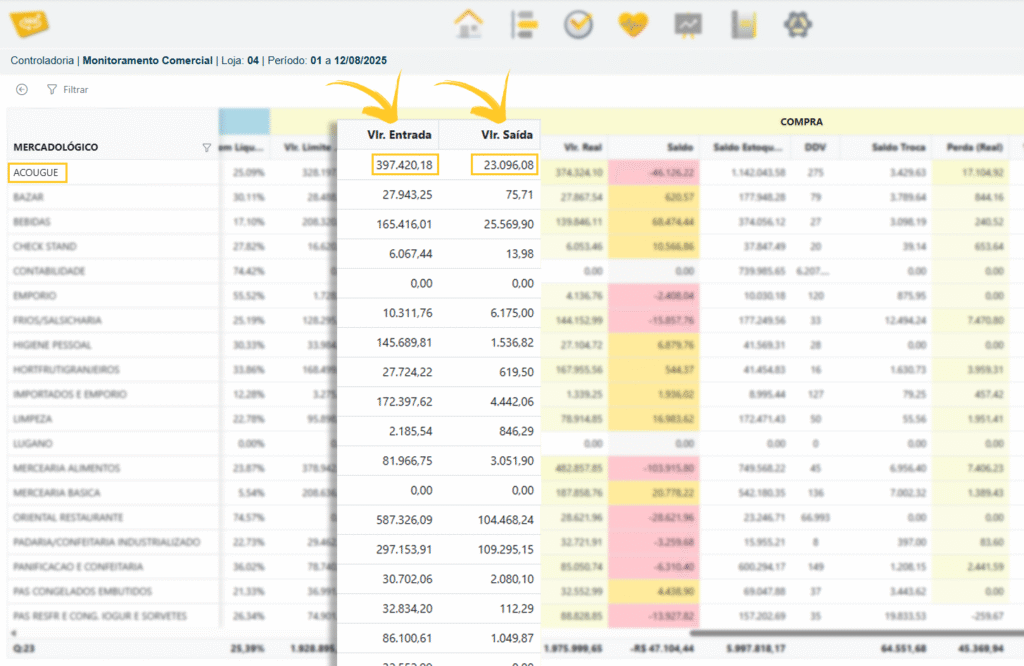
1. \[Controllership] New Parameter for Retrieving Internal Transfer Data for Purchases.
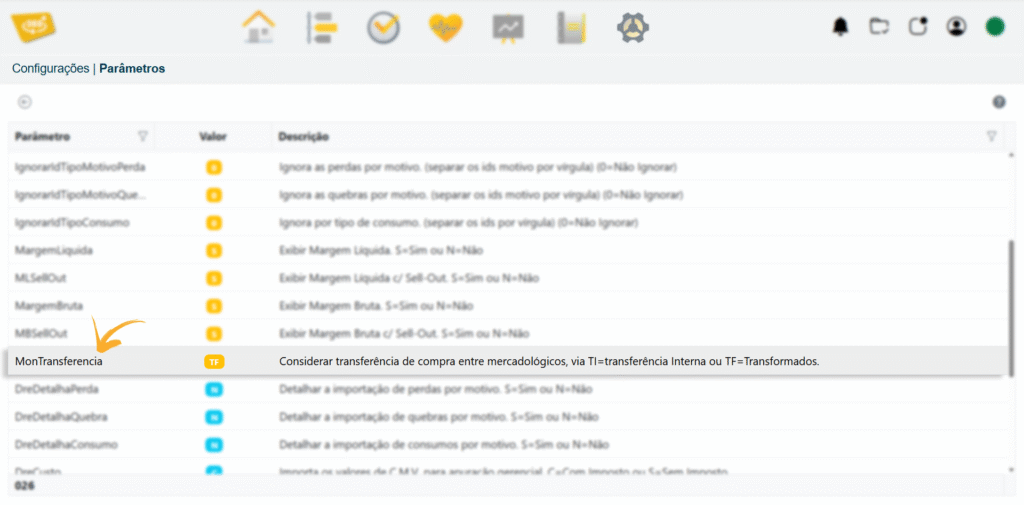
2. View the Commercial Monitoring “screen” to verify the data.
**Controllership / Commercial Monitoring / Filter / Display Details / Purchases Column**
[Original publication](https://controller360.com.br/?p=4620)
## New Features in Version 5.2.3
* ✅ **Adjustments made to Financial Flow.**
*(Sync360 must be updated for the changes to take effect.)*
* 🛠️ **Fix applied to the transaction log error message.**
Refers to the consistency table.
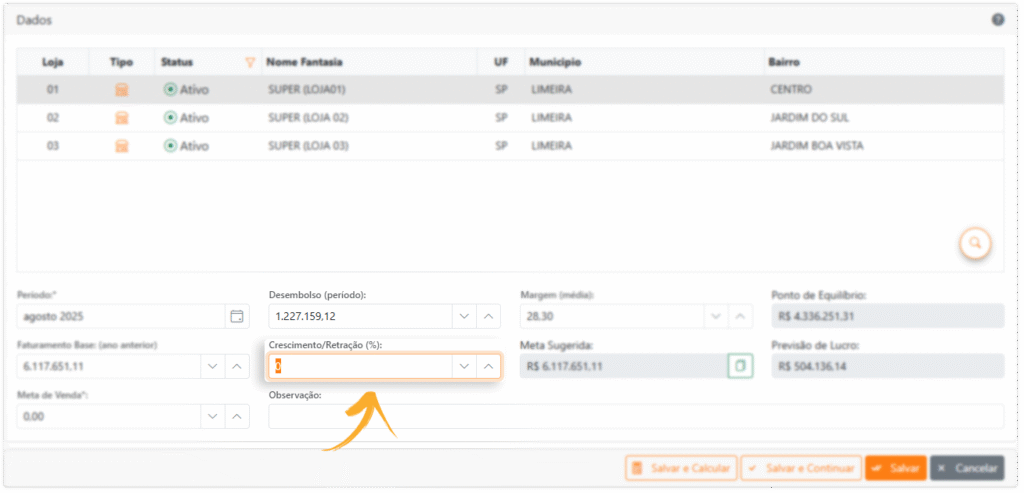
### 📉 **Growth Rate in the Controllership Budget**
**Negative values** can now be used, supporting strategic scenarios in which projected revenue is lower than Base Revenue, as shown in the image below;
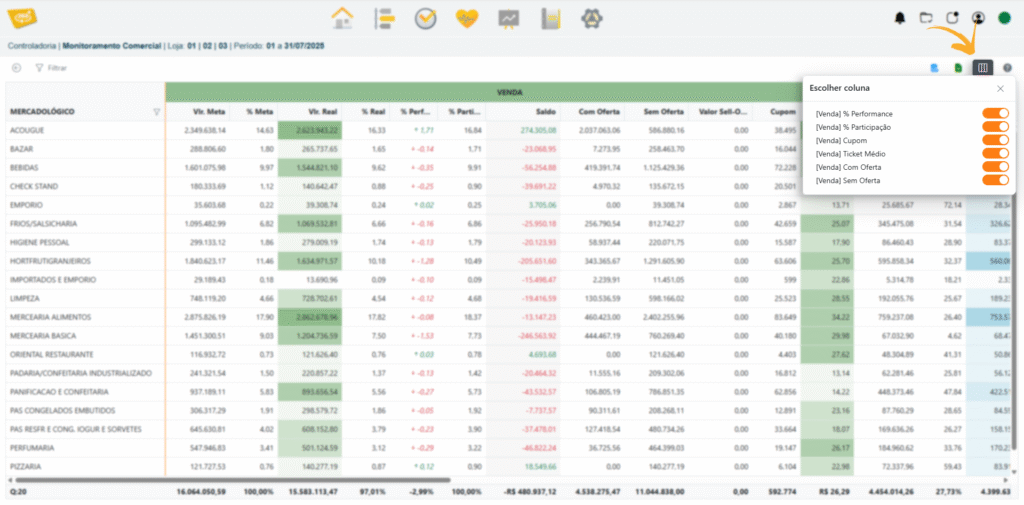
### 👁️🗨️ **Option to Hide Columns in Commercial Monitoring**
👁️🗨️ Go to **Commercial Monitoring > Click Filter > Display Details;**
When details are displayed in Commercial Monitoring, the **option to hide columns** will be available as shown below;
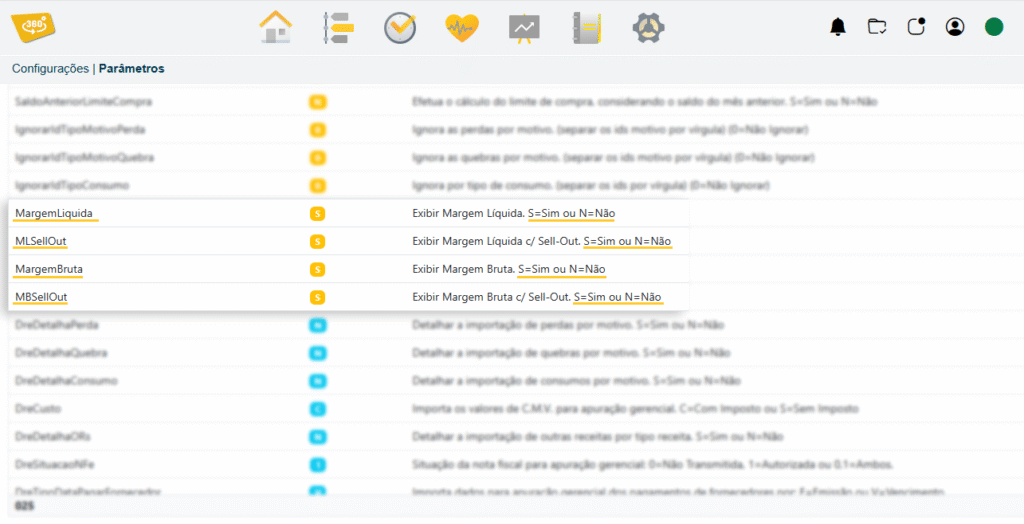
### 💰 **Conditional Display of the “Sell-Out Amount” Column**
💰 **Conditional display of the “Sell-Out Amount” column in Commercial Monitoring.**
This column will only be displayed when one of the margin parameters with Sell-Out is enabled, as shown in the image below
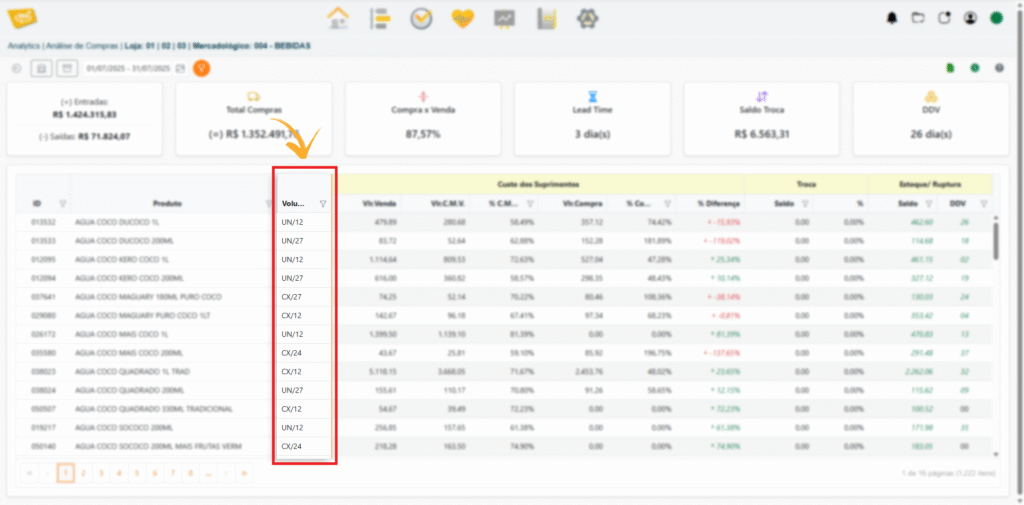
### 📦 **Addition of the “Product Volume” Column**
📦 Go to **Analytics > Product Analysis;**
**The “Product Volume” column has been added to Product and Purchase analyses**, as shown in the images below;
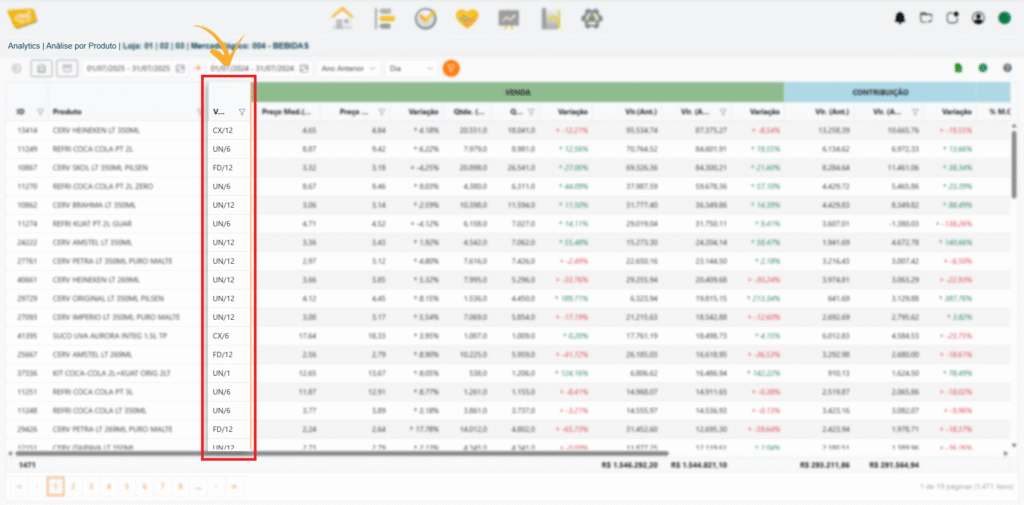
📦 Go to **Analytics > Purchase Analysis;**
[Original publication](https://controller360.com.br/?p=4579)
## New Features in Version 5.2
\[Controllership Metrics] Fixed the calculation for only one day in the receipt quantity indicator;
\[Budget] Days for which no sales are found will be reported in the progress list;
\[Budget] Adjusted month editing by merchandising category for days without sales;
\[Parameters] Discontinued the parameter: Consider Purchase Order as a Purchase in Controllership;
\[Fix] Improved Real-Time performance on partitioned databases;
\[Fix] Improved POS sales data retrieval;
### **FINANCIAL FLOW**;
1. New receivables information has been added, including **Totals Panels and Bank Balance Panel;**
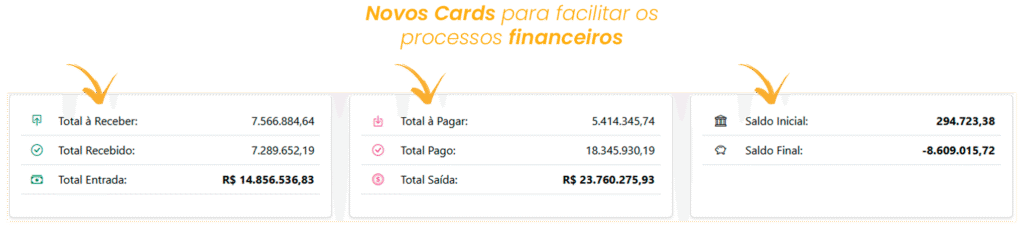
2. See the **new financial grid** below, displaying detailed **Inflows, Outflows, and Balances;**
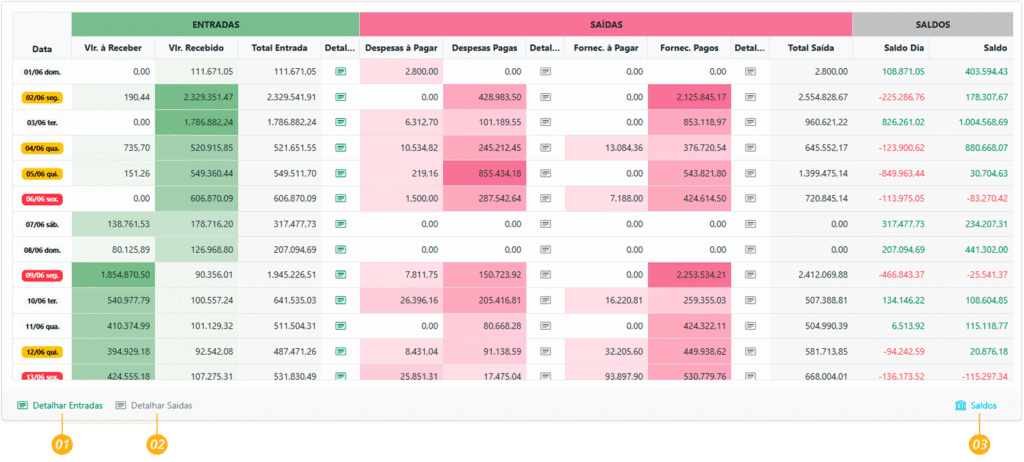
3. Clicking the **\[Detail Inflows]** button opens a detailed report, as shown in the image below\*\*;\*\*
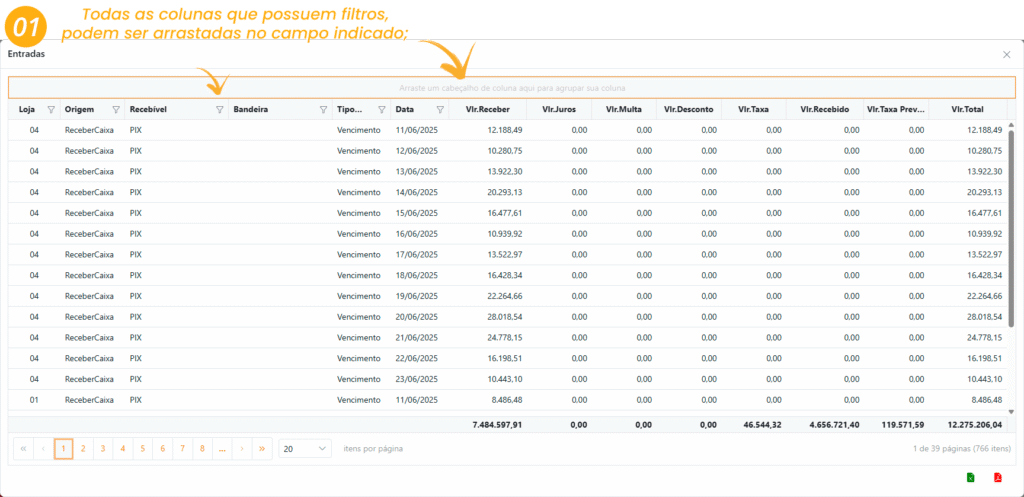
4. Clicking the **\[Detail Outflows]** button opens a detailed report, as shown in the image below\*\*;\*\*
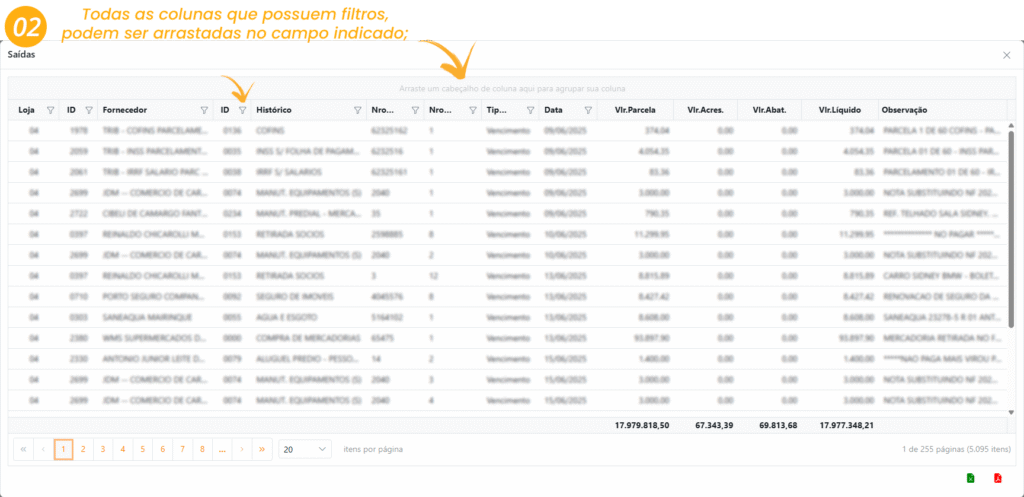
5. Clicking the **\[Balances]** button displays all bank details, as shown in the image below\*\*;\*\*
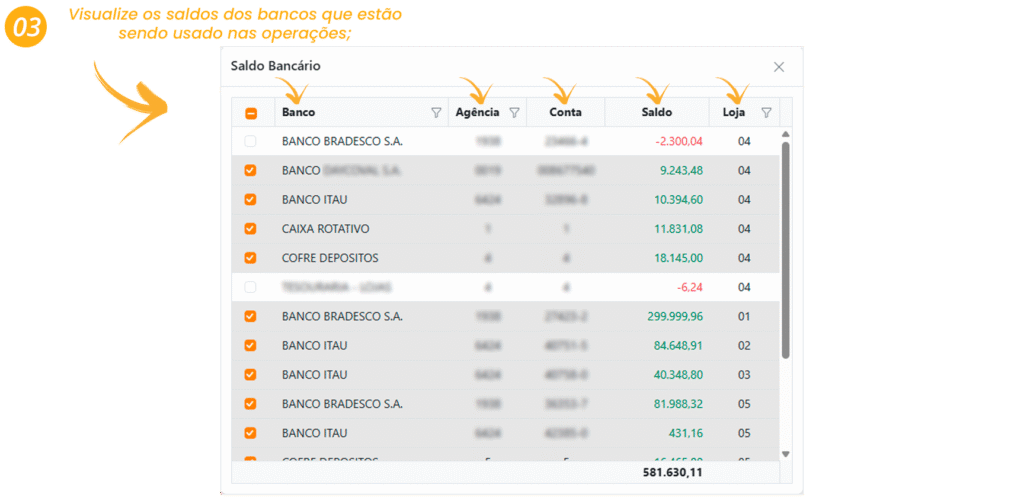
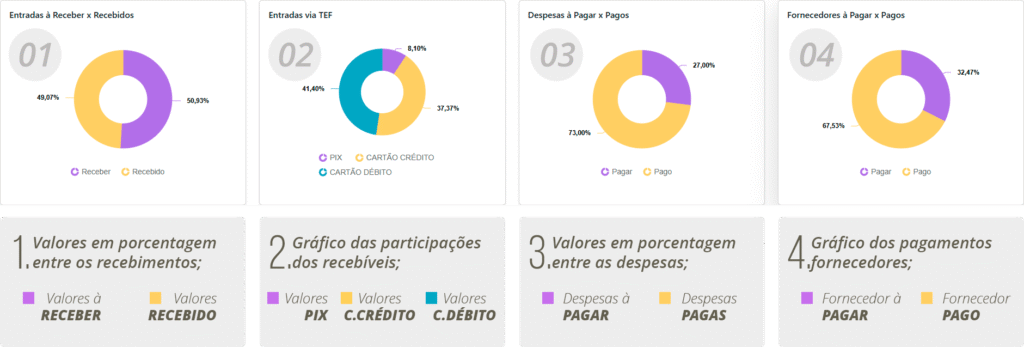
### **PARTICIPATION CHART**
1. Charts displaying details of inflows and outflows\*\*;\*\*
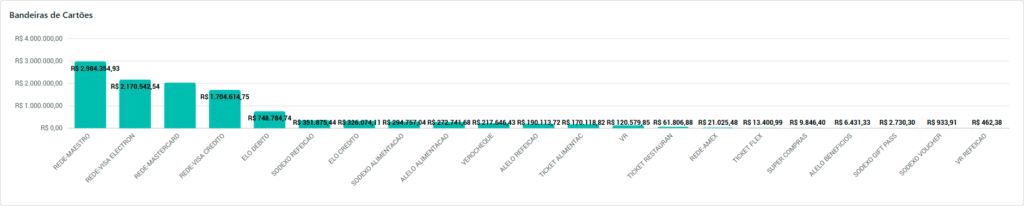
### **CARD BRAND CHART**
2. Charts displaying details of all card brands have been added to the Financial Flow screen\*\*;\*\*
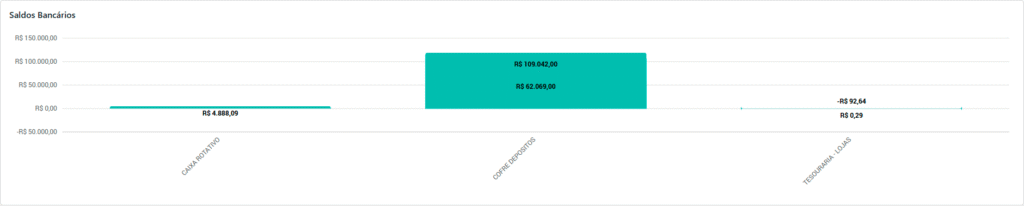
### **BANK BALANCE CHART**;
3. Charts displaying bank balance details have been added to the Financial Flow screen\*\*;\*\*
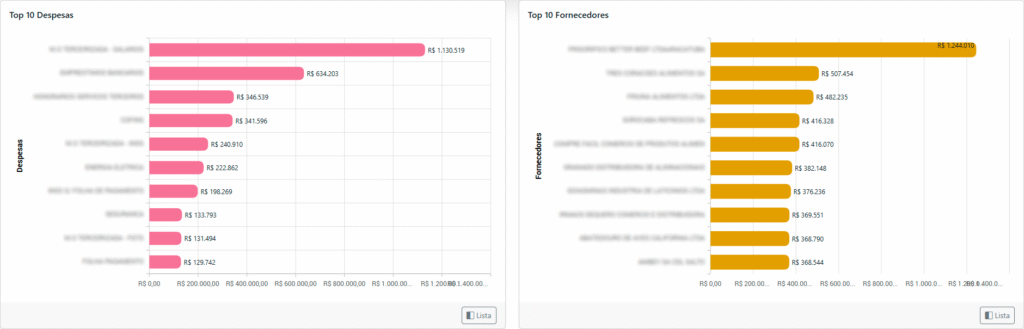
### **TOP EXPENSES AND SUPPLIERS CHART**;
4. Charts displaying details of the Top 10 \[Expenses] and \[Suppliers] have been added to the Financial Flow screen\*\*;\*\*
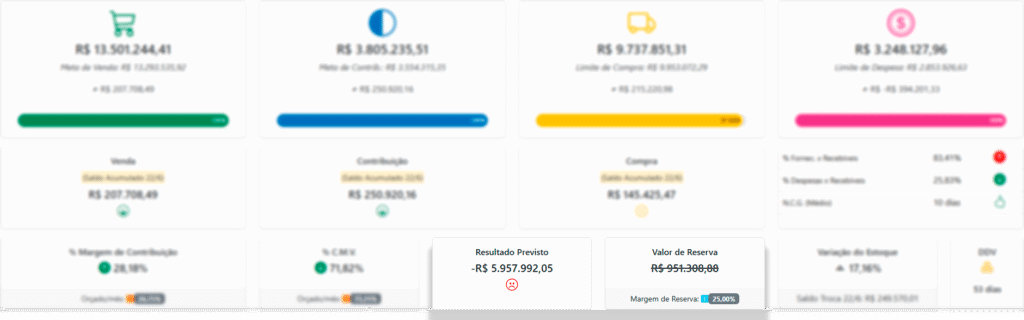
### **CONTROLLERSHIP METRICS**;
1. \[Controllership Metrics] New panel displaying the reserve margin amount;
If the **\[Projected Result]** is negative, the **\[Reserve Amount]** card will display a dash indicating that the amount was used to pay **\[Expenses]**, as shown in the image below;
### **CHARTS BY MERCHANDISING CATEGORY ON THE METRICS SCREEN**;
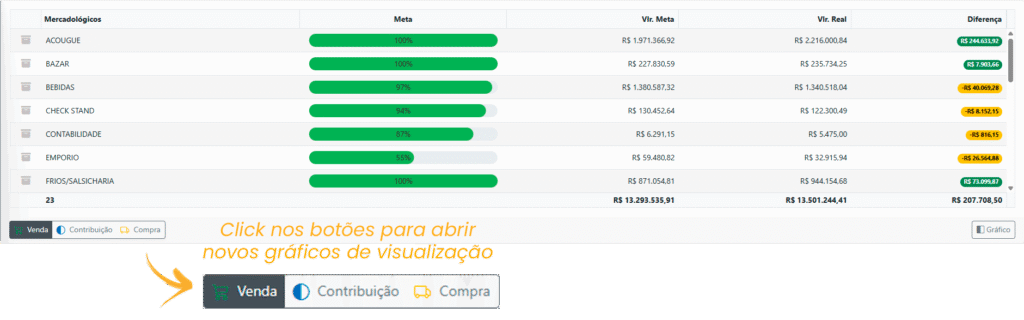
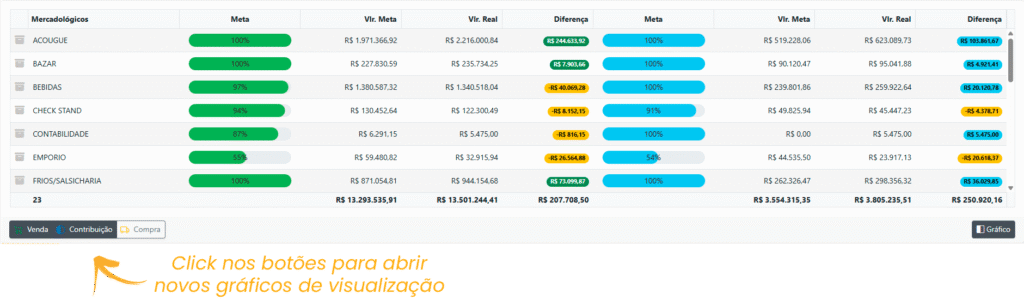
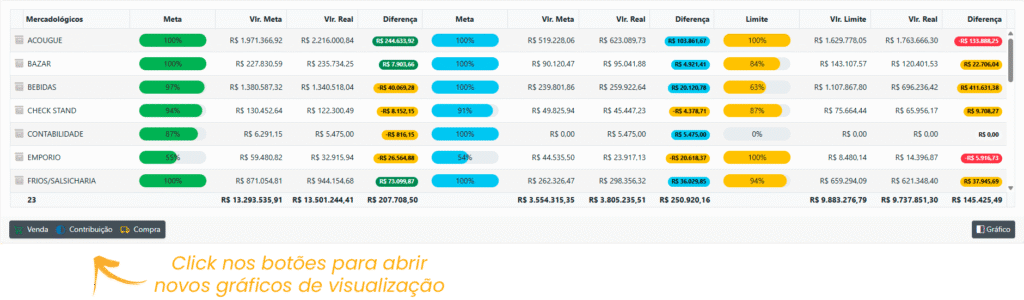
2. **\[Controllership Metrics]** Information displayed in table format has been added alongside the merchandising **sales, contribution, and purchases** chart. See the new charts in the example below;
Example displaying only **\[Sales]**;
Example displaying **\[Sales]** **+ \[Contribution]**;
Complete display example showing **\[Sales]** **+ \[Contribution]** **+ \[Purchases]**;
[Original publication](https://controller360.com.br/?p=4332)
## New Features in Version 5.1
* **Expense imports for managerial results calculation:** if expenses are entered in VR Master with a cost center, VR Controller will now import the data using the allocation, ensuring greater accuracy in managerial information.
* **Metrics screen issue fixed:** the issue that occurred when accessing the Metrics screen without other margin indicators configured has been fixed.
* **Supplier advance import adjustment:** advances will now be imported exclusively for financial results calculation by payment.
### **New Financial Flow**
1. **In the testing phase**, this new routine will replace the current **Financial Monitoring**, introducing several improvements and additional information to enhance decision-making and optimize financial performance;

2. You can now view complete details of what you have **to receive and what has already been received**, as well as details of your Expenses and suppliers, while continuously monitoring daily and accumulated balances.
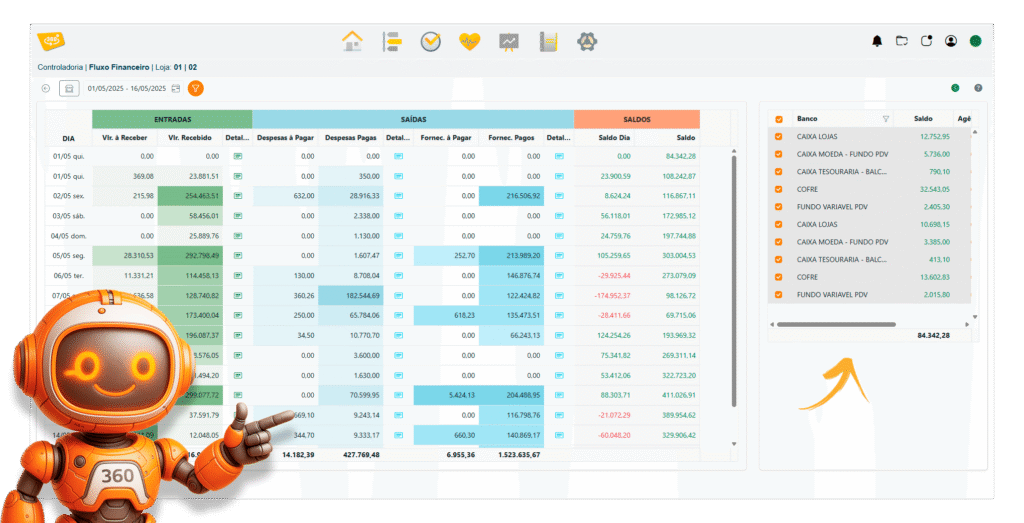
3. Closely monitor detailed balances for each bank involved in financial flow operations.

### **New Features in the Purchase Limit Routine**
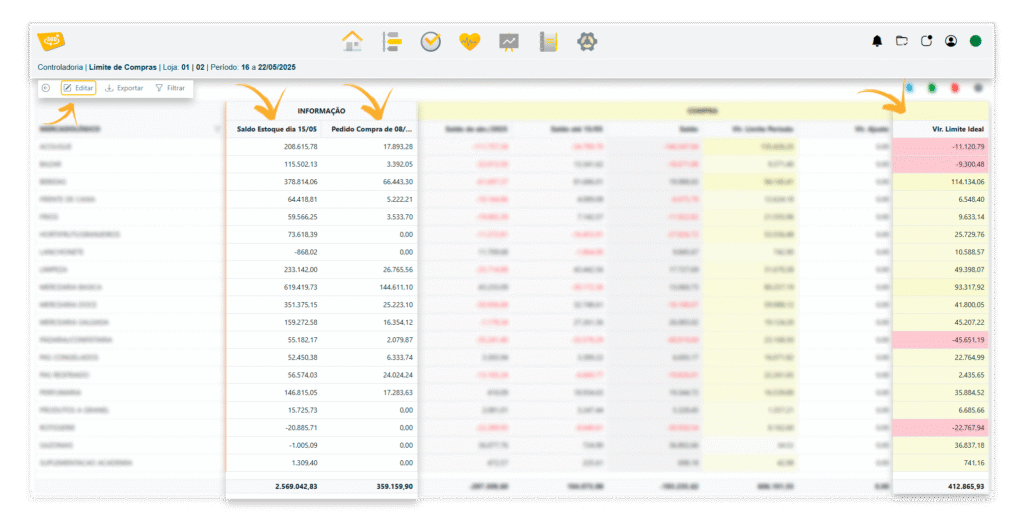
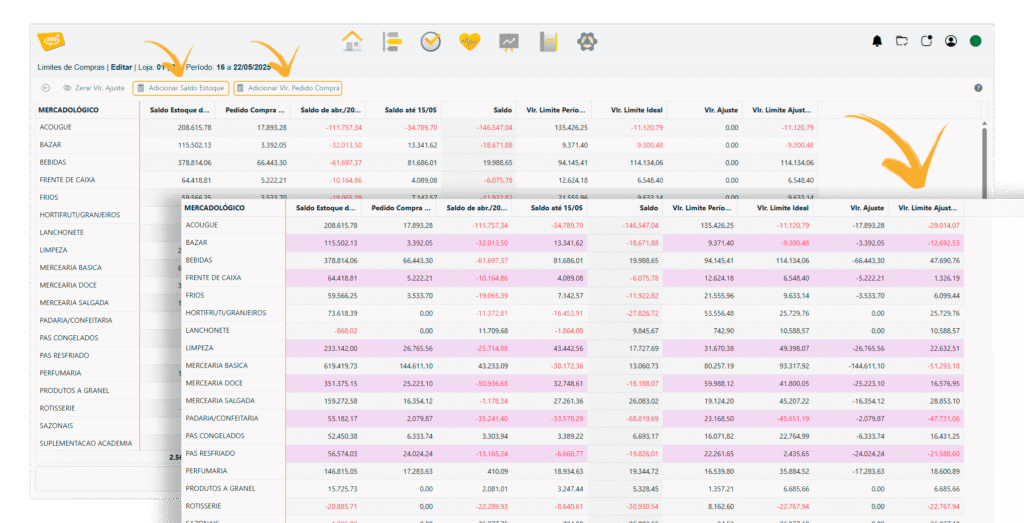
1. See how to automatically include purchase order amounts and/or the inventory balance in the adjustment column, providing greater control accuracy and efficiency.
2. Both the **Inventory Balance** and **Purchase Order Amount** can now be added to the Adjustment Limit Amount
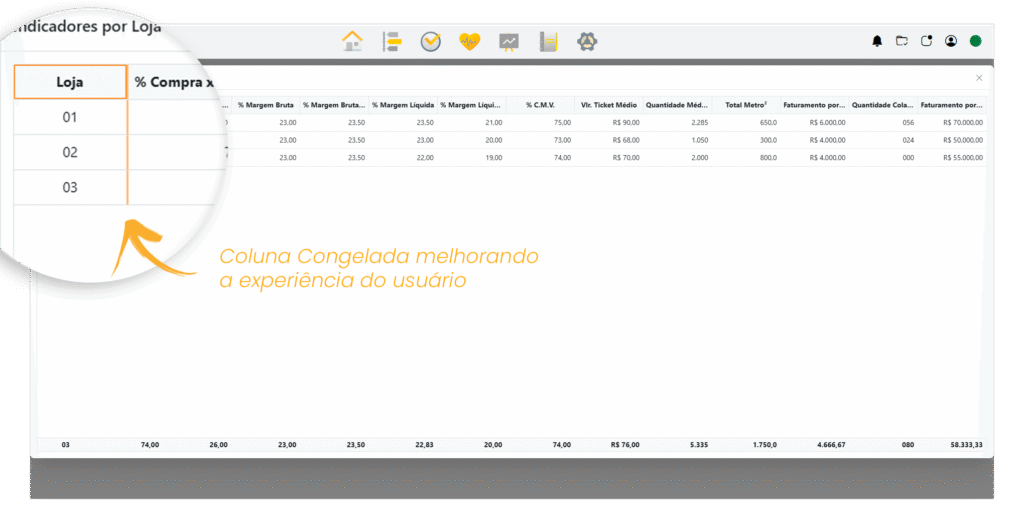
### **Frozen Columns in the Indicator Routine**
1. The store and merchandising category columns now remain fixed in the indicator record routine, making viewing and editing easier.
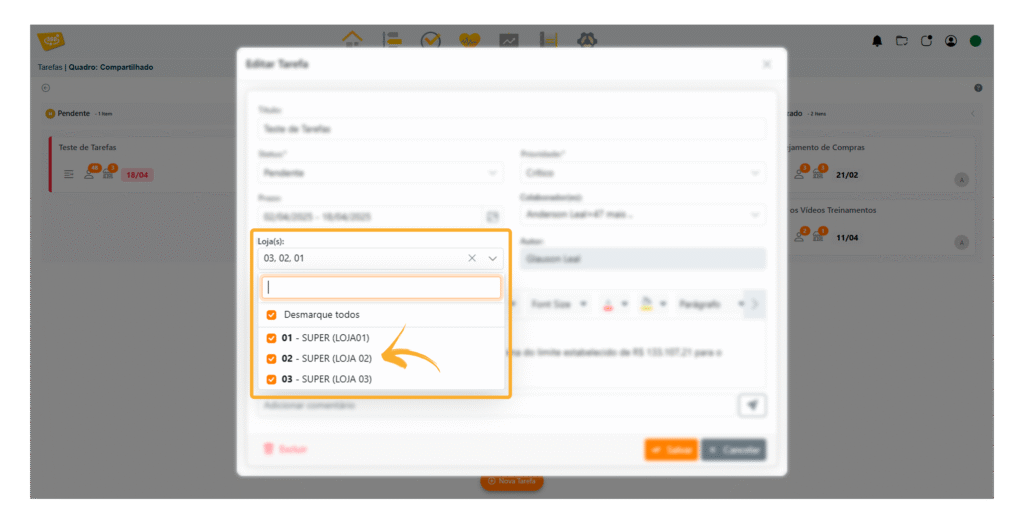
### **Store Name Display in the TASKS Feature**
1. The store name has been added to store selection in the task creation and editing features, improving identification and organization.
[Original publication](https://controller360.com.br/?p=4195)
## New Features in Version 5.0
-Better performance in the **store filter selector;**
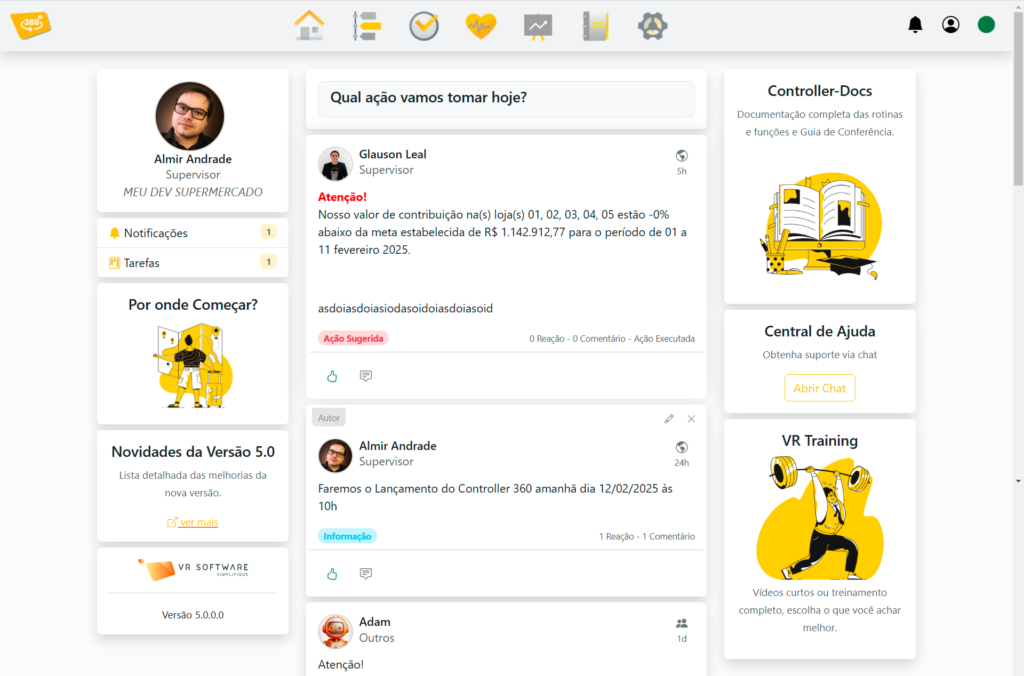
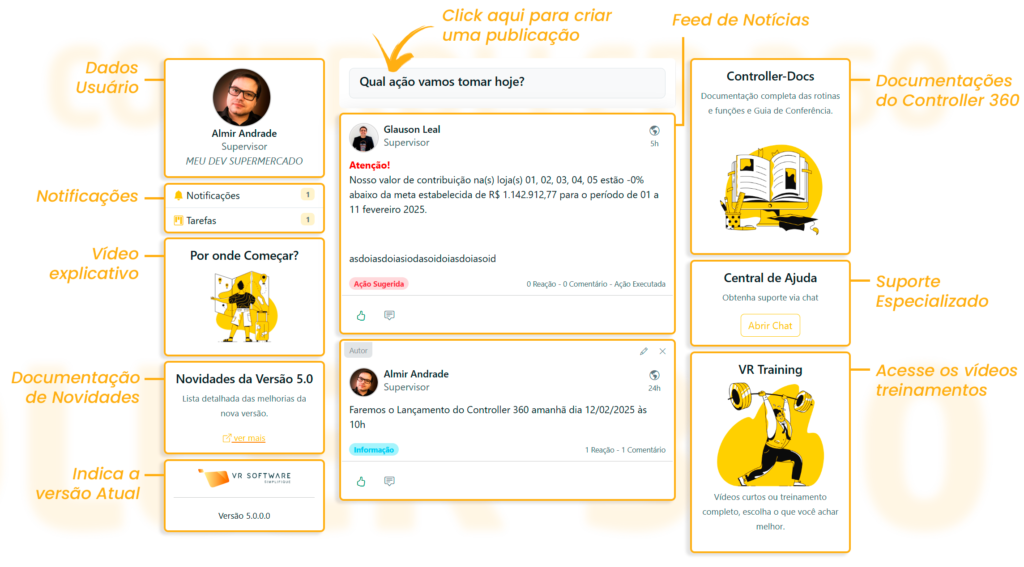
### **Discover the New Controller 360 Home Screen**
-New home page layout **displaying action feeds**;
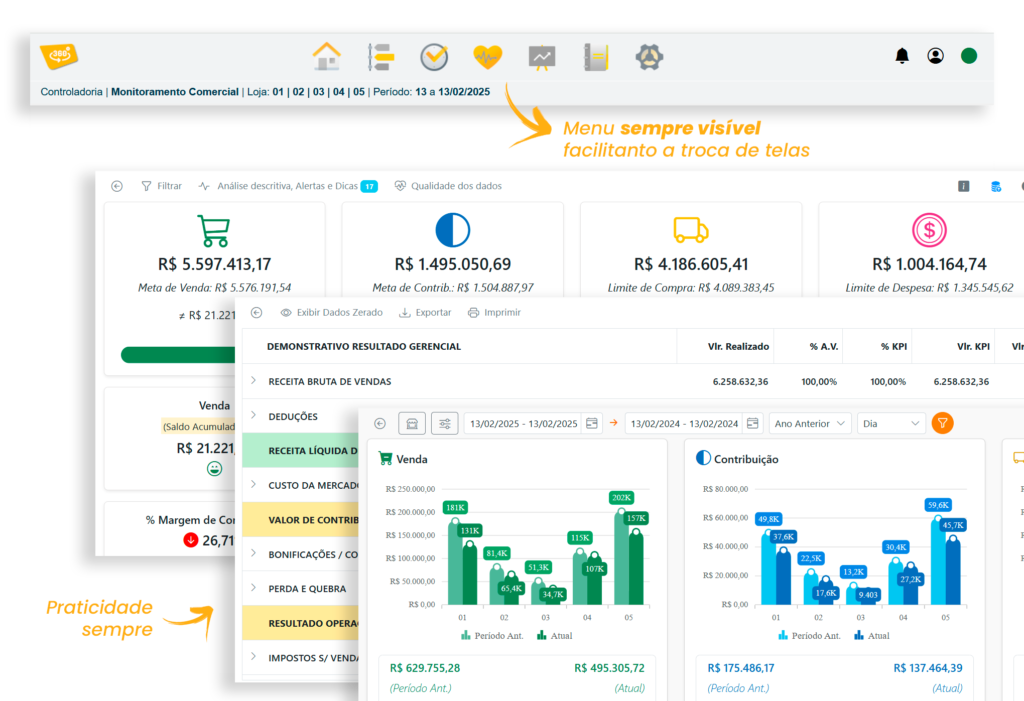
### **Main Menu Always Visible**
-New **always-visible** main access menu that allows navigation between screens **without having to return** to the home page;
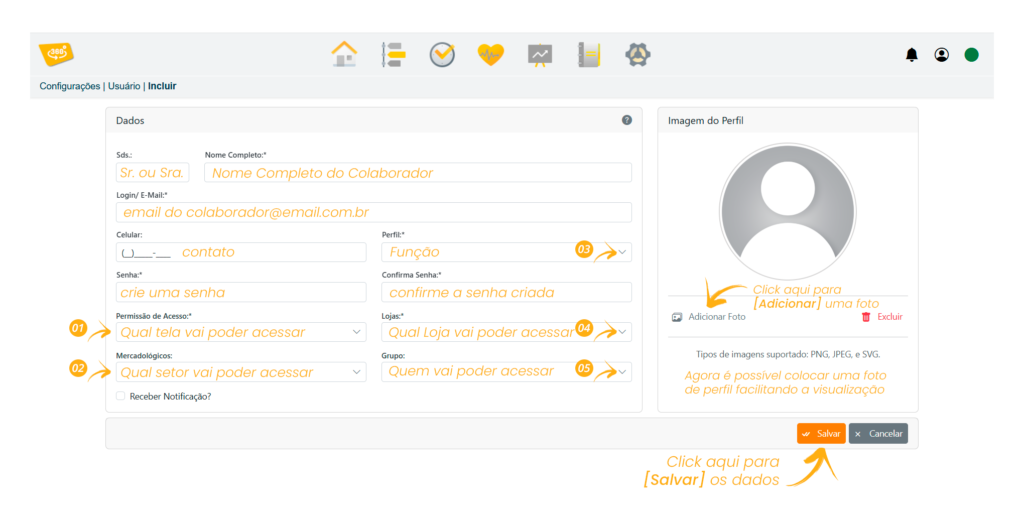
### **Redesigned User Records**
-Redesigned user records, with the option to add a photo;
-New access permission rules;
See the **record sequence below**;
### **User Group**
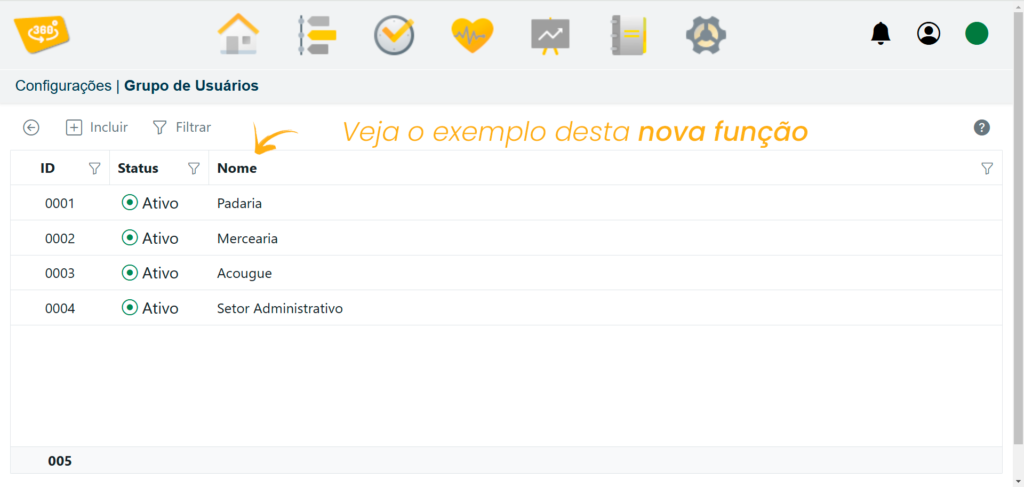
The **User Group** feature in **Controller 360** allows teams within the company to be organized and segmented by creating specific groups for different departments. This feature provides a better structure for communication and information management, ensuring that each team only has access to data relevant to its operations.
### **Suggested Actions Post**
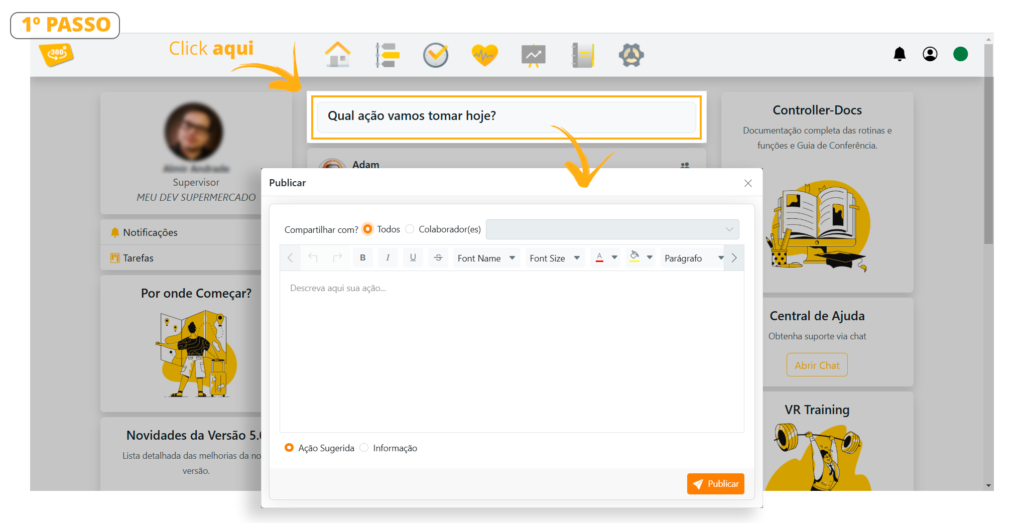
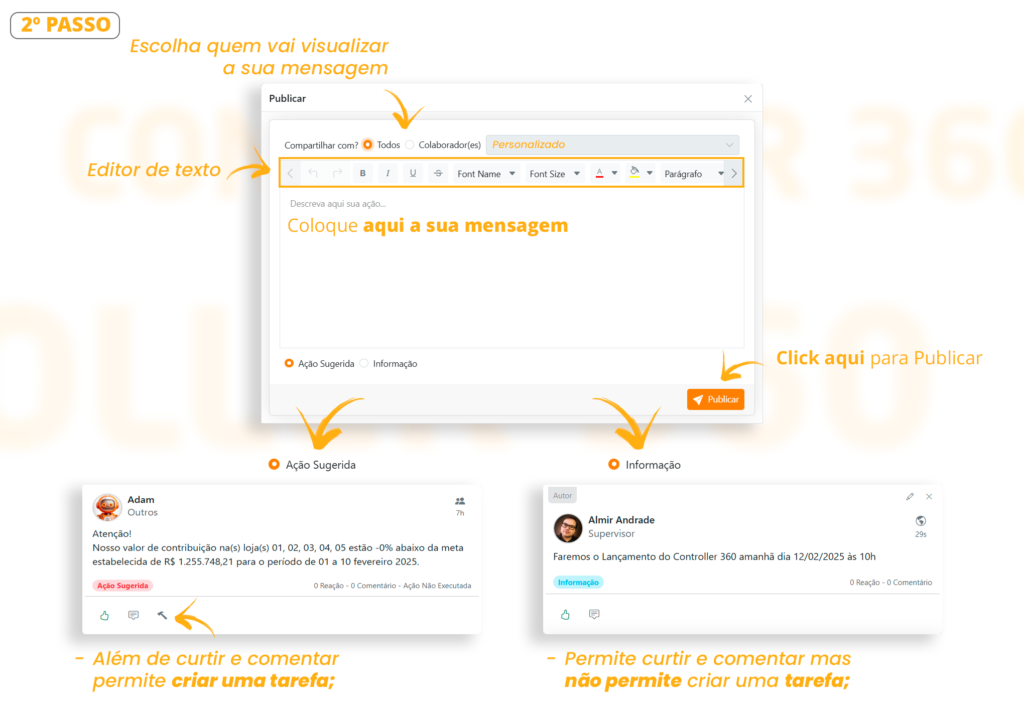
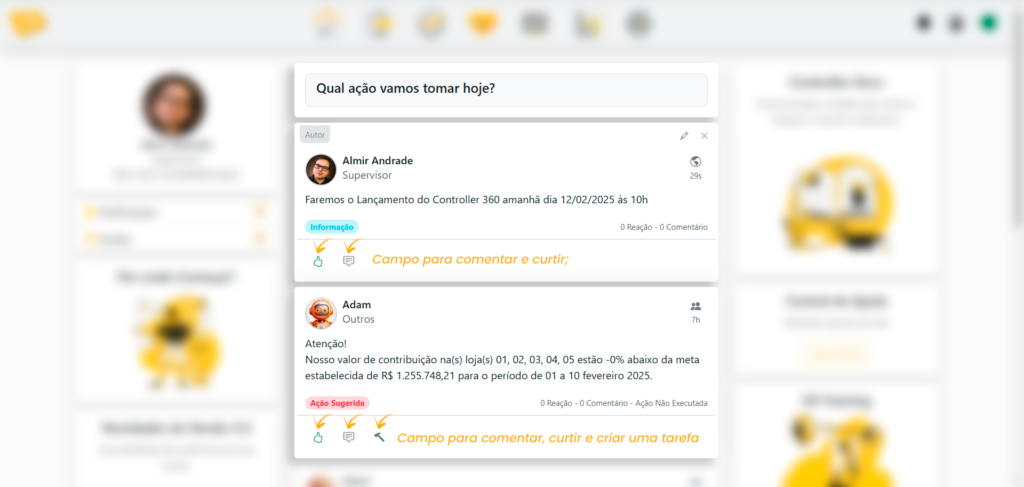
– Suggested actions post with comments and reactions;
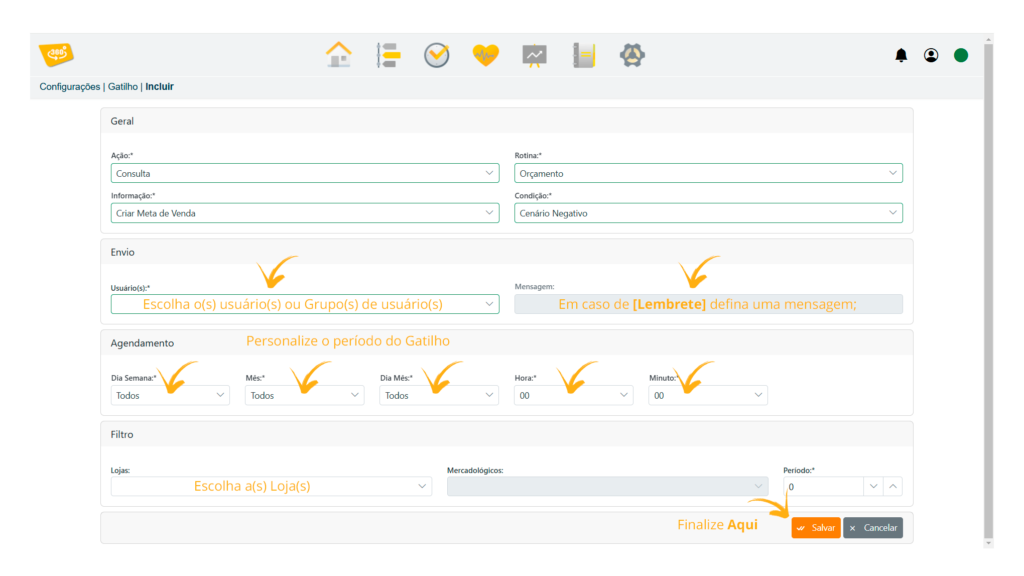
### **Analysis Triggers**
-Triggers for analyses, queries, and reminders;
This feature **provides greater agility** by focusing **your attention** on what truly matters. Whether monitoring performance, identifying problems, or highlighting opportunities, triggers help optimize system use by adapting to your specific needs.
### **Task Manager**
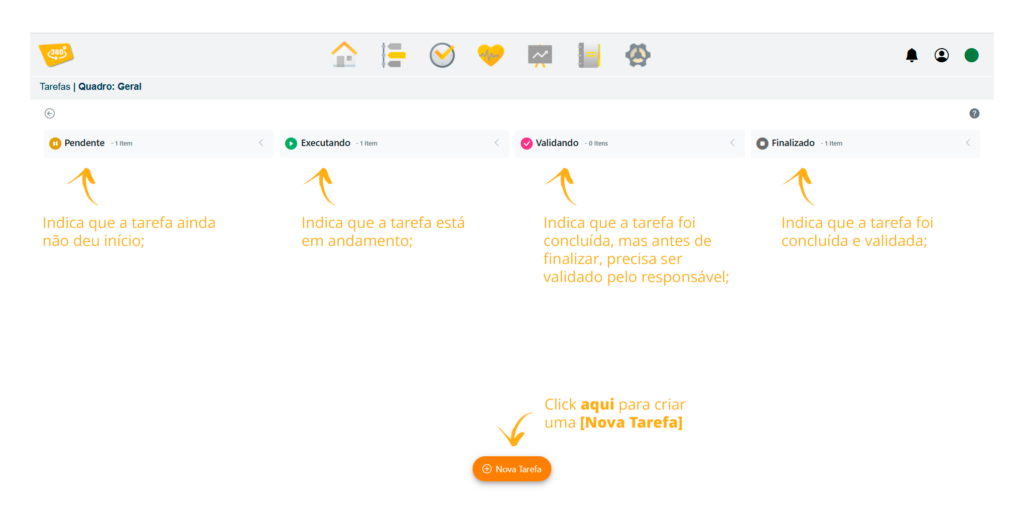
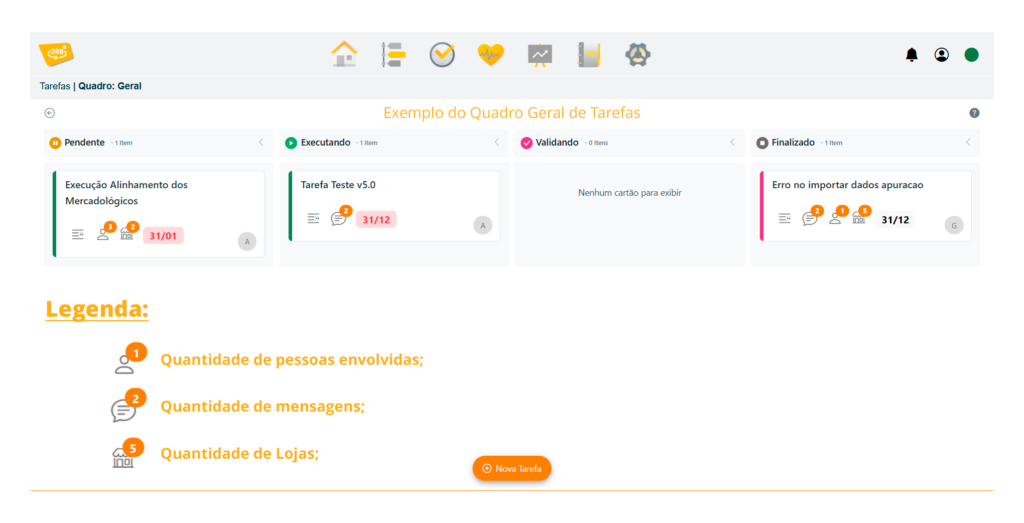
-New task manager, with separation by boards and users;
The Controller 360 ***Tasks* feature** is an essential routine for organizing, monitoring, and carrying out actions and indicators in your supermarket. This feature allows you to create **detailed task boards**, configure priorities (high, low, critical, or normal), set deadlines, and select the employees or departments that should be involved. You can also indicate which stores will be affected by the task, ensuring more focused and efficient management.
### **Post Notifications**
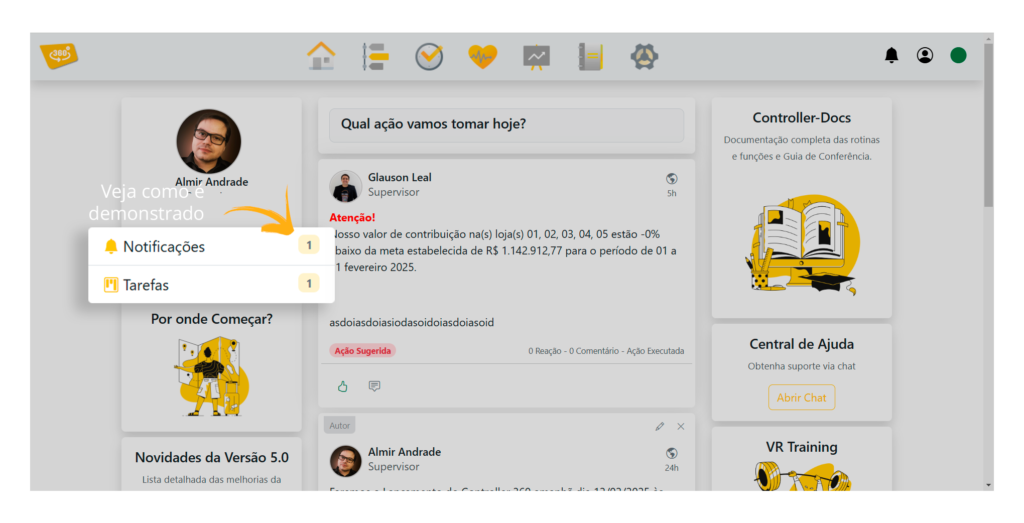
– Notifications about posts and tasks between users;
**System notifications** alert users about **new posts and tasks** that have not yet been **viewed**. Whenever a new post or task is created, **a bell icon displays** a number indicating the number of **pending items**. Once they are accessed, the **notification automatically disappears**, ensuring that the user **always remains up to date** with the latest information.
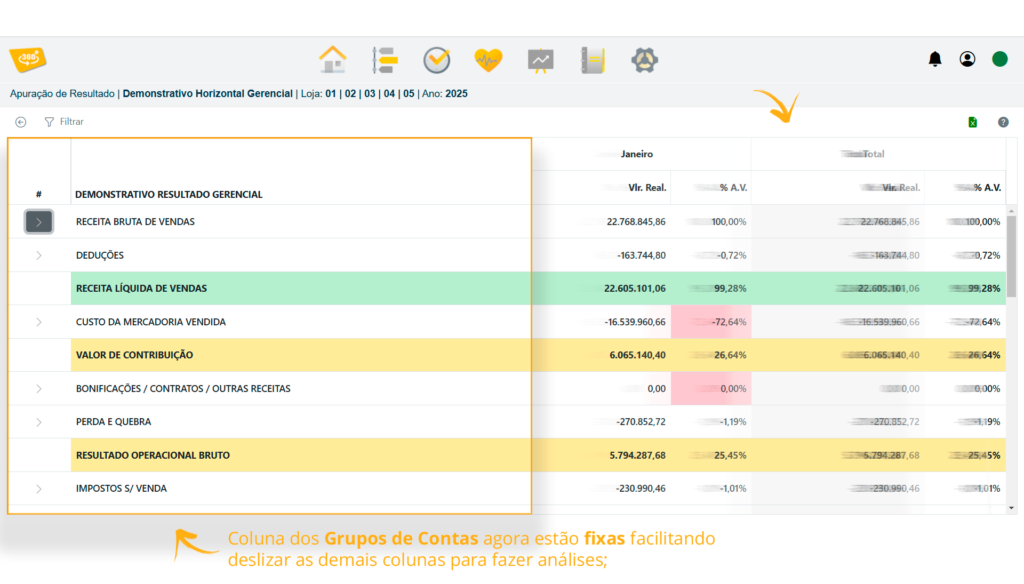
### **Horizontal Statement – Account Group Columns**
– New display for the horizontal Managerial and Financial Statements with a frozen column;
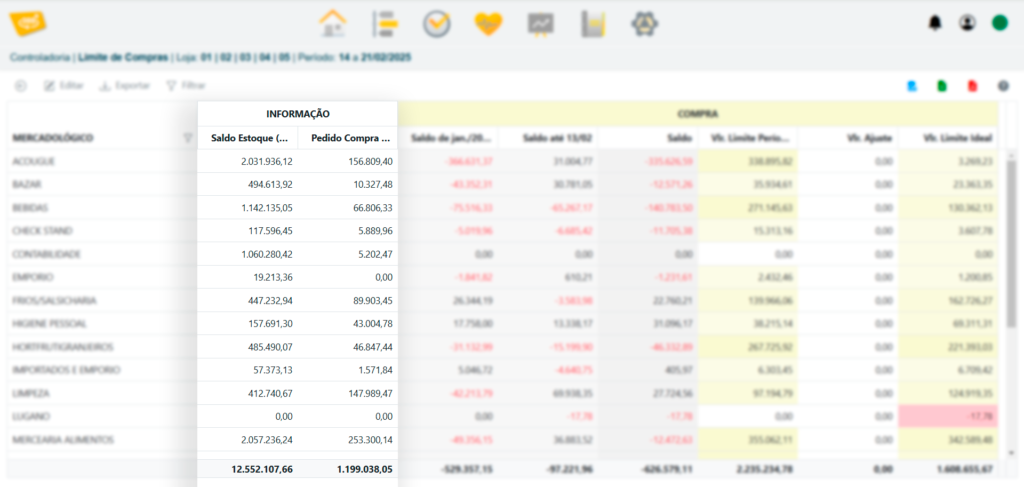
### **Purchase Limit**
– New **INVENTORY BALANCE and PURCHASE ORDER** columns in the **Purchase Limit** routine;
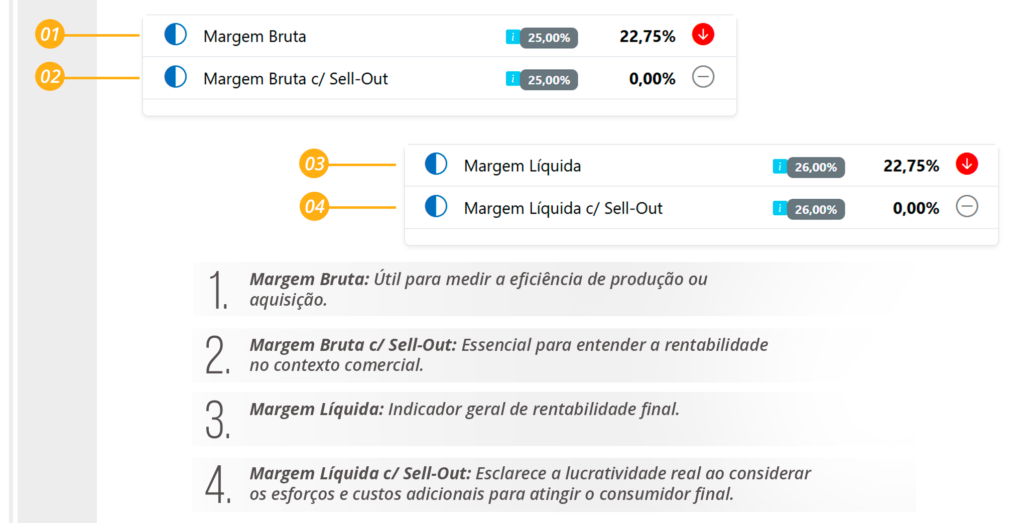
### **Addition of New Margins**
– Option to display the **Gross Margin and Net Margin with or without Sell-Out** in the Commercial Monitoring and **Metrics** routines;
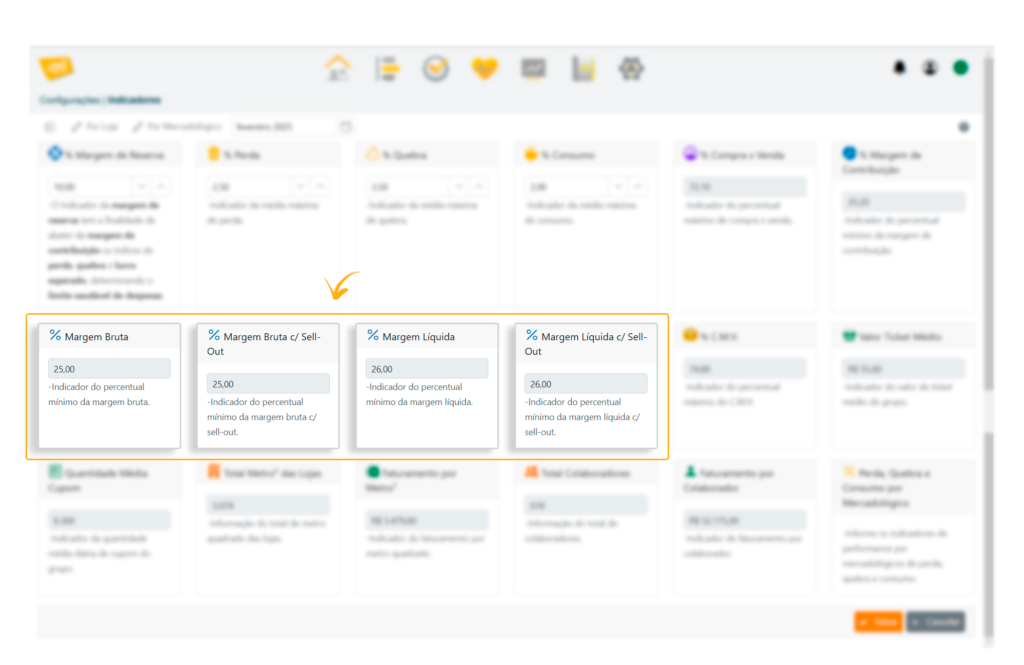
### **New Margin Indicators**
– New margin indicators that can be adjusted according to the retailer's reality;
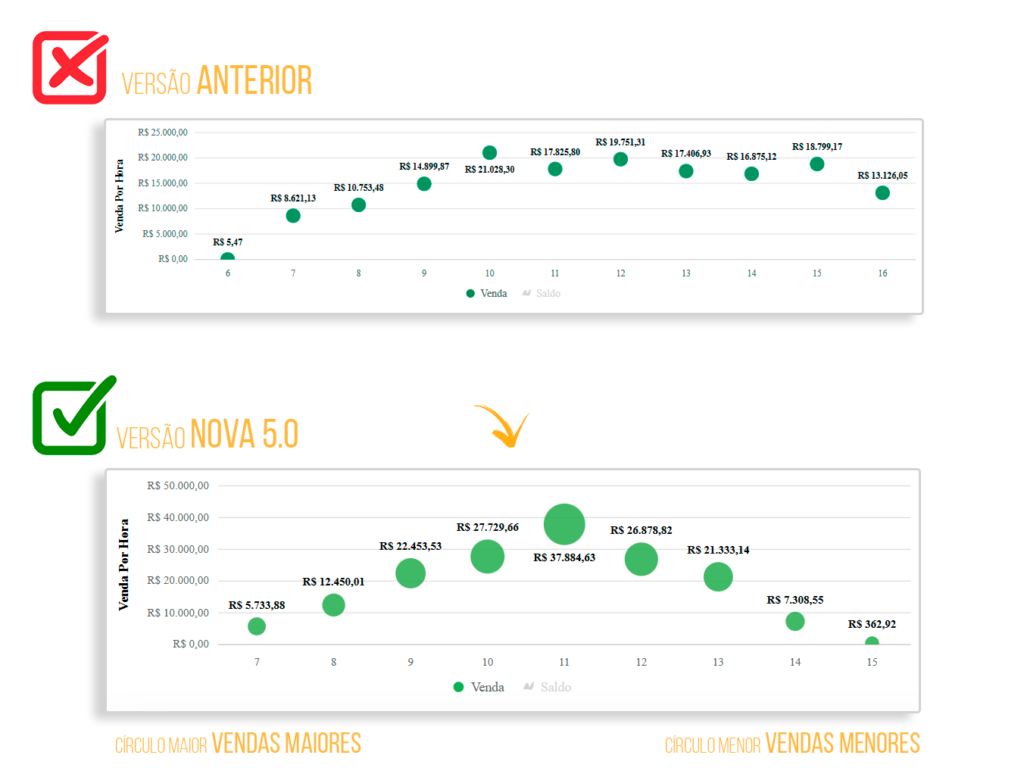
### **Sales by Hour Chart in Real Time**
– Improved display of the **Sales by Hour** chart in Real-Time;
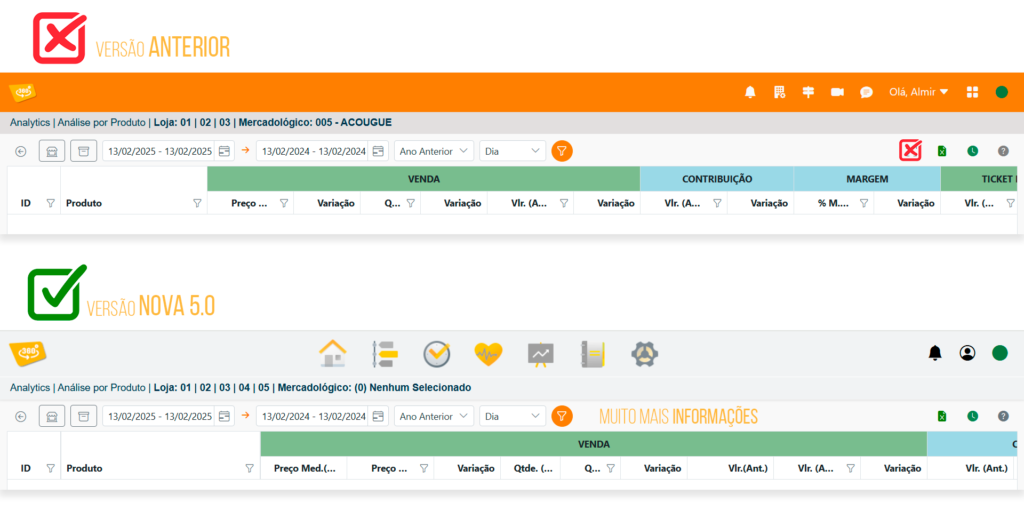
### **Product Analysis**
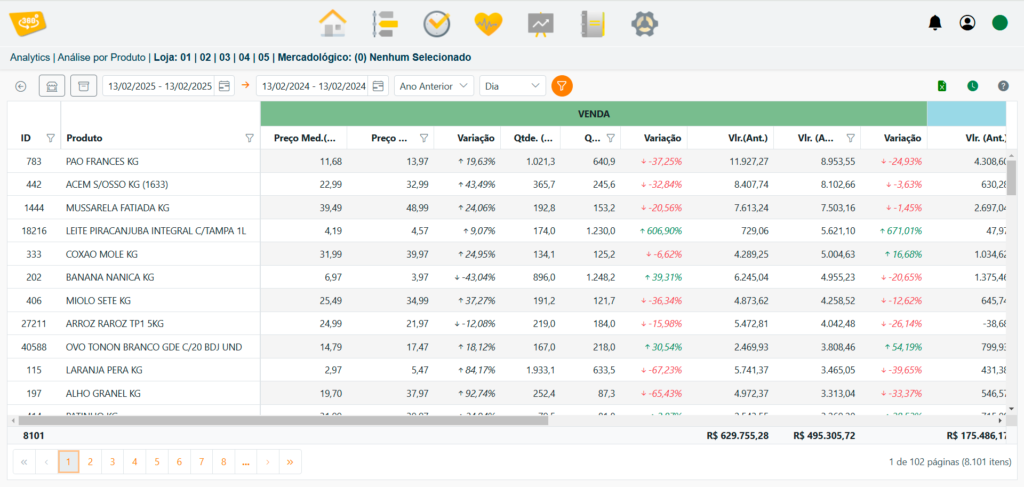
– Removed the **details** option from Product Analysis, displaying all columns when the dashboard loads;
– See the updated Product Analysis screen;
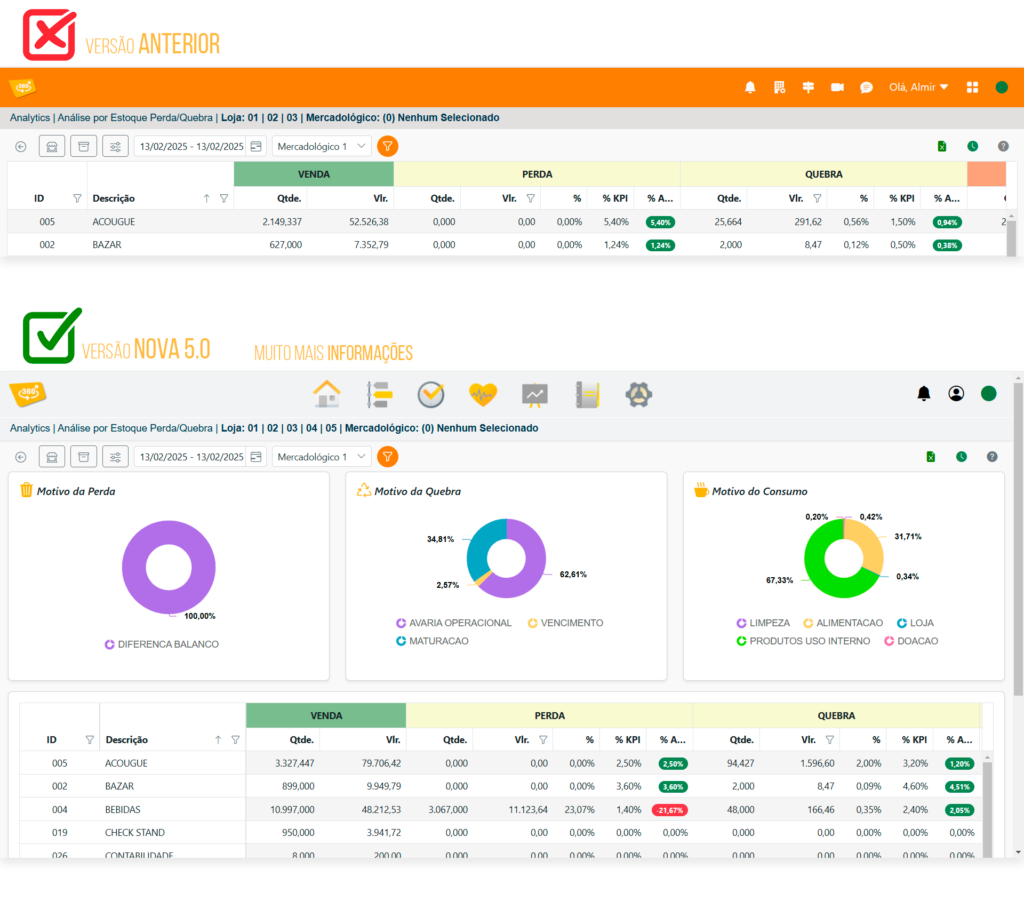
### **New Charts – Inventory Loss/Breakage Analysis**
– New charts on the **Inventory Loss/Breakage** dashboard;
### **Supplier Analysis Improvements**
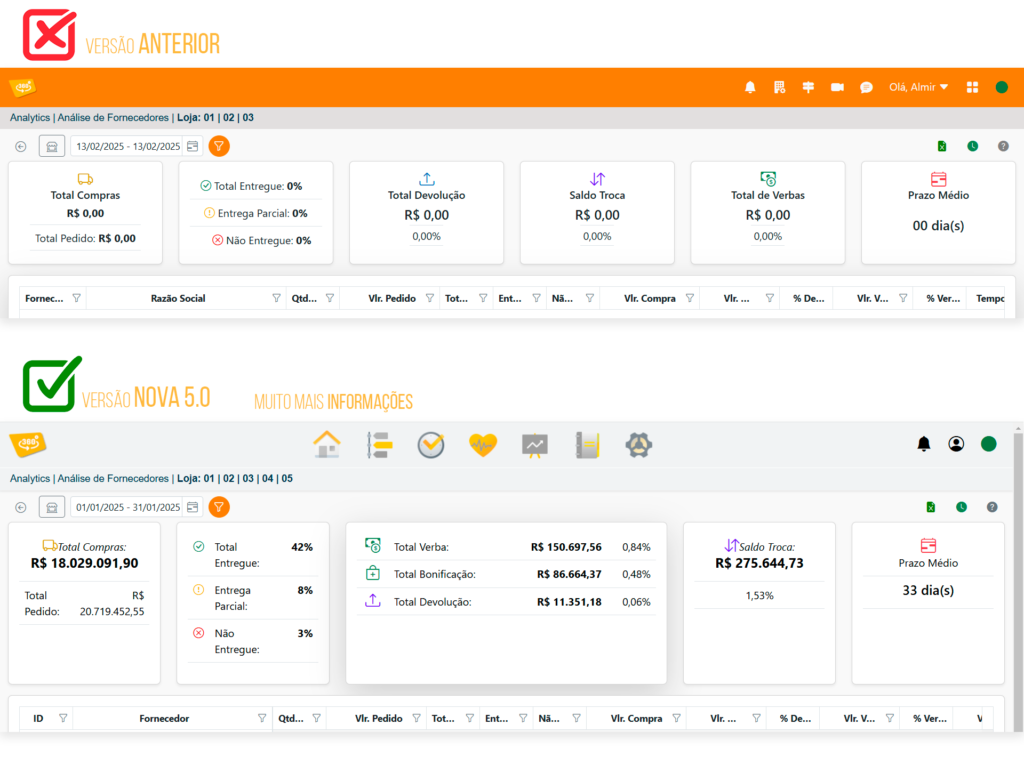
– New **bonus** information in **Supplier Analysis;**
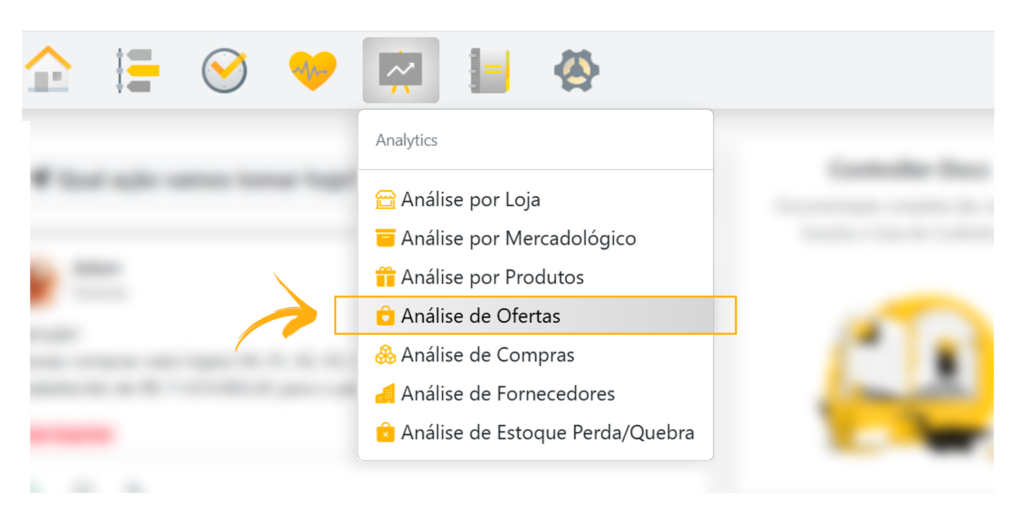
### **Analytics – Promotion Analysis**
– New **Promotion Analysis** dashboard;
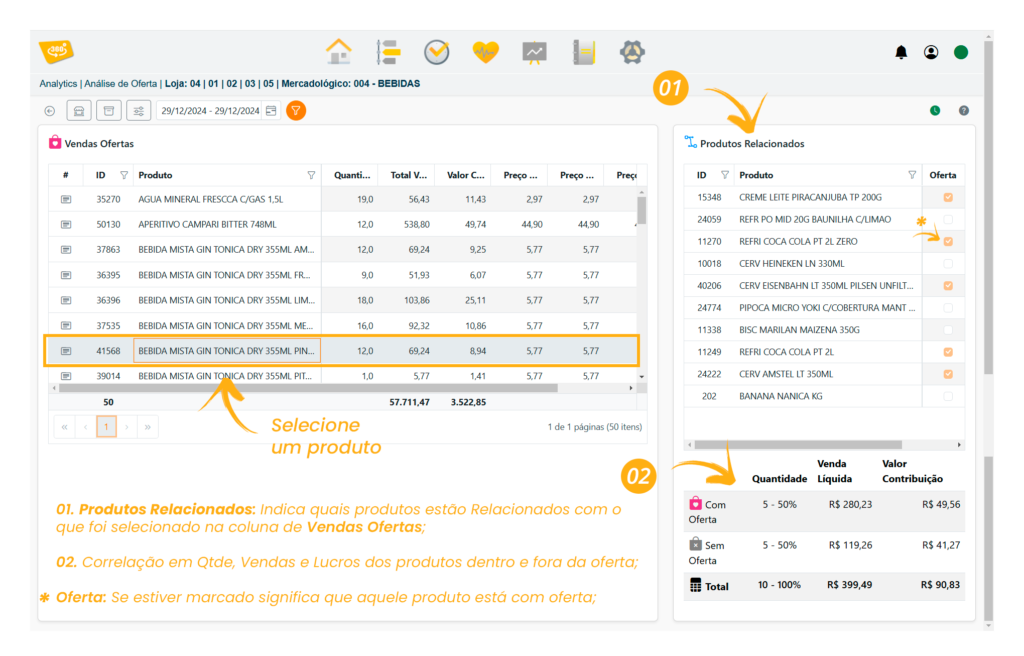
**Promotion Analysis** is a strategic tool that evaluates the impact of promoted products by identifying the items purchased with them.
This feature reveals **consumption patterns and relationships between products**, such as increased snack sales when a soft drink is on promotion. Using these insights, **managers can optimize future campaigns**, create more effective promotional bundles, and **adjust strategies to maximize results and boost sales**, turning data into effective commercial decisions.
[Original publication](https://controller360.com.br/?p=3114)
## VR Sync360 4.8.1 Fix
***
### Introduction
**VR Sync360** is an essential tool for synchronizing VR Master and VR Controller360. An issue related to leap years was recently identified, affecting the software's operation. This announcement explains how the fix was implemented and how users can update their installations.
### Detected Issue
When calculating the budget for October 2024, some users reported that **VR Sync360** behaved unexpectedly. This occurred because of an issue in the calculation of the October pre-holiday date during a leap year.
### Implemented Solution
To resolve this issue, our development team worked on version 4.8.1 of **VR Sync360**. The following measures were taken:
1. **Pre-Holiday Date Calculation Adjustment:**
* The algorithm responsible for handling dates was reviewed and fixed to correctly account for leap years in October.
### How to Update
1. **Windows Users:**
* If **VR Sync360** is already installed, the update will be automatic.
* If it is not installed yet, download the latest version [here](https://pack.controller360.com.br/Sync360.Setup.x64.exe).
2. **Linux Users:**
* Access the download link [here](https://pack.controller360.com.br/Sync360-install.sh).
* Follow the Linux-specific installation instructions.
### Conclusion
We thank all users for their patience and ongoing feedback. Version 4.8.1 of **VR Sync360** is more robust and prepared to handle calendar challenges, including pre-holiday dates in leap years. If you have any questions or require additional support, please do not hesitate to contact us.
Sincerely,
**VR Controller360** Team
[Original publication](https://controller360.com.br/?p=3082)
## New Features in Version 4.8
**Version 4.8** is the latest version of **Controller360 and Analytics360**, with many new features for the **Portal, Android, iOS**, and the **synchronizer**. It begins with the migration of the 360 platform, which receives security and performance improvements and new features detailed below:
* Fixed the Integrate and Save functions in the Chart of Accounts (ignored records);
* Fixed slow performance in the Correct Occurrences function in Data Entry;
* Transaction Log: changed the display of the POS Consistency function so that it shows the Store Number instead of the Store ID;
* Improvements to the layout of the Android and iOS applications, including better data viewing;
* \[Analytics] Adjusted the runtime screen layout;
* \[Analytics] When a filter is run in Analytics, the runtime window is displayed and then hidden;
* \[Analytics] Created new access permissions detailed by routine;
### New **Store Type** Column
A new **Store Type** column has been added to the Store List in the Portal Filters;
This makes it possible to identify whether the store displayed in Controller 360 is a DC, ADM, or Store;

### New Feature in the **DRE and DRF View**
A new feature in the **DRE and DRF View** allows rows with zero values to be hidden;
With a single click, rows with zero values can be hidden, simplifying and improving the report view.

### New **Delete, Reopen, and Batch Generate Movements** Feature
A new Data Entry feature allows users to **Delete, Reopen, and Batch Generate Movements**;
One or more movements can now be selected at once for deletion and reopening, making processes faster.

### New Layout for **\[Execution Confirmation]** Windows
New layout for execution confirmation windows;
The visual design is now more dynamic, making the process easier to understand.

### Security in the **\[Delete]** Feature
The Delete function window has a new layout that requires the user to type the word **‘YES’**, preventing accidental deletions;
It is now possible to **delete more than one movement at once**. To ensure these actions are safe and prevent unwanted deletions, users must type **“YES” to confirm deletion**.

### Added a **\[Help]** Link
A help link has been added in the upper corner and directs users to content corresponding to the current screen;
The link directs users to the exact help document for the screen used in the operation.

### New **Sales, Contribution, and Purchases by Merchandising Category** Chart
A new **Sales, Contribution, and Purchases by Merchandising Category** chart is available on the Metrics screen in the Portal and Applications;
It provides many more options for viewing detailed data through charts.

### New **(Store + Merchandising Category) and (Merchandising Category + Day)** Filters
A new filter option has been added to Commercial Monitoring: **(Store + Merchandising Category) and (Merchandising Category + Day)**;
Specific reports can now be viewed quickly and easily using these filters. Simply select a specific period and the desired filter to generate the detailed report.

### New Feature for **Exporting DRE and DRF**
DRE and DRF can now be exported to Excel and PDF in an analytical or summary layout directly from the screen;
An assistant was created that allows users to select the desired option when exporting.

### New Information Added to **Commercial Monitoring**
New information has been added to Commercial Monitoring: Sales Participation by Store and by Merchandising Category;

### Improvements to the **Results Calculation Report** Viewer
Viewing reports is now more practical, and the main export file formats are also indicated.

### New Filter in the **Horizontal Managerial and Financial** Reports
A new filter model has been created in the Horizontal Managerial and Financial Statements, allowing periods to be selected instead of only years;

### **\[Analytics]** New **Current, Previous, and Variation Average Price** Columns
\[Analytics] Product Analysis: added new columns for current average price, previous average price, and variation;
These new columns show the average product price for both the current and previous periods, making analysis even easier.

### **\[Analytics]** New Panel with the **Purchases vs. Sales %** Calculation
\[Analytics] Purchase Analysis: added a panel with the Purchases vs. Sales % calculation;

### **\[Analytics]** New Information Added to Supplier Analysis
\[Analytics] The following information has been added to Supplier Analysis: **Order Quantity, Total Order Amount, Undelivered Orders, Partially Delivered Orders, and Fully Fulfilled Orders.**

[Original publication](https://controller360.com.br/?p=2719)
## New Features in Version 4.7
* Modified the activity log to improve synchronization support and prepare for version 5.0
* Changed the Budget screen classification to store + period
* Last Synchronization now displays the date of the most recent consistency check completed and synchronized
* Budget calculation improvements:
* If there is no data for the budget calculation, the system retrieves the COGS and Margin registered in the indicators by store
* The daily budget calculation (for stores without monthly or annual data) no longer calculates only one day. It now creates the budget for every day of the month based on the day for which data was found.
* Improved day/month editing in the budget calculation.
### New Permission Named **\[Indicator Settings]**
This new feature can restrict a user's ability to change indicator settings or prevent a specific user from changing them.

### New Filter in the **\[Chart of Accounts]** Column
You can now search for and find your **“Charts of Accounts”** much more easily by clicking the filter indicated in the image below.

### New ‘Type’ Parameters in **\[Managerial Results Calculation]**
Three new parameters have been created in the Managerial Statement: **\[DRE Detail Loss], \[DRE Detail Breakage]**, and **\[DRE Detail Consumption]**. View all these details in your managerial report.

### **Application** – Real Time Vertical Ranking
Store rankings can now be viewed on a completely new and exclusive screen. See below how to view them;

### **Application** – New Filters in Commercial Monitoring
**3 new filters** have been developed in Commercial Monitoring.
You can now choose from: **\[Day], \[Stores]**, or **\[Merchandising Categories]**;

### **Application** – New Features on the **Purchase Limit** Screen
The merchandising category column is now fixed and adjusted.
Purchase plans can now be created and viewed directly through the App;

[Original publication](https://controller360.com.br/?p=2680)
## New Features in Version 4.6
* Fixed email validation on the application login screen;
* Changed the default Controllership Metrics filter. If it is the first day of the month, data for the entire previous month is displayed; otherwise, data from the first day through the final day of the period is displayed;
* Improved Metrics performance;
* Fixed grid filter errors in the Data Entry routine: Open and Verify functions (Managerial and Financial);
### **Version 4.6 – New Features in the Controller 360 Portal**
1. Improvements to the indicator settings layout;

2. A **‘Save and Continue’** button has been created in the **\[Data Entry]+\[Enter]** function for the \[Managerial] and \[Financial] layouts;

3. See the updated **\[Delete Spreadsheet Data]** button below;

4. A new filter has been created in **\[Commercial Monitoring]**, displaying data by **\[Merchandising Category + Day]**;


5. Improved display of the **\[Generate]** button in the **Managerial and Financial** Statements; it is only displayed when data is available to generate;

6. Improvements have been made to the **‘Save and Continue’** button in the Chart of Accounts creation function;

7. In the **Results Calculation/Data Entry** routine, the display of the Open and Reopen functions has been changed;

8. Action notification messages in the Portal have been completely redesigned.
Each action is displayed in a list, with options to pause and display the time until the message closes;

9. A feature has been created to **\[Unlock]** a user without having to perform a complete edit;

### **Version 4.6 – New Features in the Controller 360 App**
1. Fixed a failure when opening the application if there was no calculated budget;

2. Added application Metrics screens that display sales, margin, and purchases by merchandising category, comparing target/limit with actual values;

[Original publication](https://controller360.com.br/?p=2498)
## New App360 Version 4.5.0
**We are pleased to present the new version of the Controllership application for Android and iOS.**
**VR Controller360 v4.5**
This release marks the beginning of a broader vision that has made the application **similar to the Portal**, introducing several improvements such as:
– Complete and detailed screens like Real-Time;
– Metrics;
– Commercial Monitoring;
– Purchase Limit;
It is now much simpler, more dynamic, and faster—designed for mobility. App360 takes another step toward bringing Controllership closer to you.

### **METRICS**

### **COMMERCIAL MONITORING**

### **PURCHASE LIMIT**

### **REAL TIME** – Merchandising Category

### **REAL TIME** – Finalizing POS


Note: Version 3 will be discontinued after December 31, 2023
[Original publication](https://controller360.com.br/?p=1794)
## New Features in Version 4.5
The new version 4.5.0 of the Super360 Platform introduces new features, improvements, and fixes. See the details below and feel free to contact us with any questions.
* Updated layout, colors, and icons.
* Improvements to VR Sync360 log records.
* New option to open the Budget Calculate function using parameters from the selections made in the main grid.
* Adjusted the validation message displayed when creating/editing users.
* New Controller360 transaction log feature that displays VR Master logs and POS consistency checks.
* New feature for synchronizing inbound type, outbound type, and merchandising category records with VR Master when automatic synchronization fails.
* New zoom capabilities in Real-Time and Metrics charts.
* Improved loading performance on the Controllership Metrics screen.
* Adjusted records in the daily Controllership synchronization log.
* New configuration of loss, breakage, and consumption indicators by merchandising category and level.
1. **New Controllership Features**/ Budget
The **Save and Calculate** and **Save and Continue** processes are now more dynamic. See the image below.

2. Status Name: Changed from “Open” to **“Created**”

3. **New Real Time Features**: New Charts, Layout, and color updates.


4. **New Analytics Features**
New Analytics360 dashboard for loss, breakage, and consumption analysis.


[Original publication](https://controller360.com.br/?p=1621)
## New Features in Version 4.4
The new version 4.4 of Platform360 introduces new features, improvements, and fixes. See the details below and feel free to contact us with any questions.
1. A new feature in the Results Calculation Data Entry routine makes it possible to verify movements in a simplified way. Movements can now be verified without opening them. Simply select the desired movement column and click the “VERIFY” button.
**See the example below**

2. Improvements to the Create and Calculate Budget function allow budgets to be created sequentially and improve the selection of calculation parameters.
By default, the system selects “**None**,” as shown in the image below.
– **“Save and Continue”** option: designed for users who need to create more than one budget without closing and reopening the same window.
– **“Save and Calculate”** option: calculating the budget is now easier. With this option, clicking **“Save”** takes the user directly to the calculation window with the selected parameters.

3. Adjusted user record validation so that the administrator access permission is selected exclusively.
See the detailed images below


Example: note that the **“Administrator”** function must not be selected together with other functions.
See the examples below

Example: these are some examples of the correct way to select functions.
Note that the “Administrator” function already has access to every department, so there is no need to select additional departments once “Administrator” has been selected.

4. Fixed the deletion of users who are re-registered with the **same email/login.**
A previously deleted user can now be registered again as many times as necessary.
5. Adjusted the Calculate Budget function layout to better support smaller screens.
6. Updated the version in the Platform360 layout.
[Original publication](https://controller360.com.br/?p=641)
## VR Sync 4.4 – Update
The new version 4.4 of VR Sync360 introduces database connection improvements, a new update server, several fixes, and support for the Linux operating system

.
To download the new Version 4.4, click [here](https://controller360.com.br/v4/Sync360.Update.exe).
[Original publication](https://controller360.com.br/?p=631)
## New Features in Version 4.3
The new version 4.3 of Platform360 introduces new features, improvements, and fixes in Analytics and Controllership. See the details below and feel free to contact us with any questions.
* Created a new Analytics filter bar, expanding the options for adjusting the previous period, adding new predefined dates, and introducing new validation of days between periods, allowing any type of comparison.
* Added a new sales quantity variation column to Product Analysis.
* Added a Display Details button (hidden columns) to Product Analysis.
* Fixed the Average Ticket and Number of Receipts values that were not displayed for every product in Product Analysis.
* Changed Purchase Analysis by adding the exchange and inventory/out-of-stock columns.
* Added the option to export Purchase and Supplier analyses to Excel.
* Added filter options to value fields to refine the desired information.
* Added a new Supplier Analysis dashboard.
* Changed the loss, breakage, and consumption cards to display the information against sales. Amount information (R\$) will be displayed in new Store Analysis cards.
* Adjusted the store filter layout.
* Changed Purchase Limit exports to VR Master so there is no longer a limit on the number of merchandising categories that can be exported.
* Added a restriction to Purchase Limit exports to prevent exporting periods that already exist in VR Master.
* Fixed the buyer filter in the Commercial Monitoring layout.
This release requires VR Sync360 v4.3 or later to display VR Analytics360 data;
[Original publication](https://controller360.com.br/?p=574)
## New Features in Version 4.2
VR Controller360 4.2 introduces new Controllership features, adjustments to Results Calculation, improvements, and fixes. See the details below and feel free to contact us with any questions.
* Added new calculations to Commercial Monitoring for loss, breakage, and consumption percentages.
* Changed the “Balance + Acc.” column to Purchase Limit Amount Balance, which adds the purchase limit adjustment amount + balance + previous month's balance (optional).
* Added new parameters for ignoring loss and breakage by reason and consumption by type.
* Fixed the store, date, and merchandising category columns in Commercial Monitoring.
* Adjusted the Purchase Limit grid layout to improve column title visibility.
* Improved the organization and layout of parameter settings.
* Added digital wallet amounts to Commercial Monitoring (optional).
* Added new “general types” to the Chart of Accounts integration screen.
[Original publication](https://controller360.com.br/?p=555)
## Improvements in Version 4.1.3
The new version (4.2.0) of VR Sync360 focuses on performance, improving the execution speed of VR Analytics360 dashboard analyses by up to 90%. Affected routines: Store Analysis, Merchandising Analysis, and Product Analysis.
VR Sync360 updates automatically. For a manual update, click [here](https://controller360.com.br/v4/Sync360.Update.exe).
[Original publication](https://controller360.com.br/?p=548)
## New Features in Version 4.1
VR Controller360 4.1 introduces new Controllership features that provide greater detail when defining sales targets and a preview of the desired result, along with several improvements and fixes. See the details below and feel free to contact us with any questions.
* Added a new Real-Time panel displaying budgeted and actual contribution margins;
* Real-Time improvements and fixes for stores without a calculated budget;
* Added a calculation formula to help define the store/month sales target in the Budget routine;
* Added a panel to the Metrics (Controllership) routine displaying a preview of the expected result based on the reserve margin[;](https://github.com/lealanderson/Controller360.Platform/issues/55)
* Started work on creating VR Benchmarking;
* Improved typing in date fields within filters for the Budget, Data Entry, and Horizontal Statement routines;
* New shortcuts in Account Group, Chart of Accounts, Data Entry, and Managerial and Financial Statements;
* Fixed the Totals Account Group record;
* Changed Chart of Accounts creation and editing to allow the Tag ID relationship only through the Integrate function;
* Improvements to the Standard Chart of Accounts;
* Improved deletion of consolidated results calculations in the managerial and financial models;
* Added the “Forgot My Password” function;
[Original publication](https://controller360.com.br/?p=507)
## Improvements in Version 4.0.4
After the release of VR Controller360 version 4.0 and feedback from our most attentive clients, we made several adjustments.
* When Real-Time is accessed, actual data is loaded instead of only budgeted data.
* Adjusted printing of the Results Calculation report.
* Adjusted column formatting in Financial Monitoring and Indicators by Store.
* Adjusted synchronization of merchandising categories, inbound types, and outbound types in VR Sync360.
* Adjusted VR Sync360 reinstallation.
* Improved data entry imports through layout files (Excel).
* Improved Chart of Accounts searches in the Enter and Edit Data Entry functions.
* Improved the Edit Month and Edit Month by Merchandising Category Budget functions.
* Added a new feature to notify the user when the session has ended.
[Original publication](https://controller360.com.br/?p=483)
## New Features in Version 4.0
**VR Controller360 4.0 includes more than 70 improvements, new features, and fixes. This page highlights several major advances designed to make your intelligent data analysis experience more intuitive and feature-rich.**
* The VR Controller360 Portal introduces a range of new features and capabilities, completely redesigned responsive screens, new icons, action and response messages, improved font quality, and information layouts that display more data in the same screen space. See more details below:
* Access login with an option to keep the session active.
* Home Screen:
* New main menu divided by modules, with settings grouped in one place.
* Exclusive menu for smaller screens and smartphones.
* Top menu with more details about the logged-in user, access to Controller-Docs, and VR Sync360 connection status information.
* New shortcut area in the upper-right corner, replacing context menus (right mouse button).
* New notification area.
* Real-Time
* Real-Time makes it possible to monitor sales, sales by store, sales by hour, sales by merchandising category, promotional sales, contribution margin, average ticket, number of receipts, and other daily information against targets, all in real time.
* Controllership
* New parameter that calculates sales participation using the previous month's database.
* Added the projected margin to the summary trial balance export.
* Improved calculation performance in editing functions.
* The Edit %CM, %COGS, %Loss, %Breakage, or %Consumption by Month/Merchandising Category function was incorporated into Edit Sales Target by Month/Merchandising Category.
* New Edit Sales Target by Month/Merchandising Category calculation that preserves seasonality by day and merchandising category.
* New feature for editing the Purchase Limit, providing greater flexibility in purchase planning.
* Option to synchronize only commercial or financial data.
* Improvements to balance columns in Commercial Monitoring.
* Hourly synchronization of financial data.
* New indicator routine with indicators for total store square footage and number of employees.
* New W\.C.R. indicator (working capital requirement) displayed on the Metrics screen.
* Results Calculation
* Option to import only commercial or financial data.
* New “Source” field indicating the VR Master table from which the information was imported.
* Improved performance when calculating and consolidating results.
* Improved spreadsheet data import function.
* New feature for viewing the history of actions generated in the Dashboard.
* New Horizontal Managerial and Financial Statements with new monthly %H.A. columns and %V.A. in the Annual Total.
* Settings
* Improved Account Group classification function.
* Improved Chart of Accounts classification function.
* New Chart of Accounts integration routine between VR Controller360 and VR Master, displaying inbound and outbound types and making it easier to view the source and destination of information within VR Controller360.
* Improved the % KPI column by displaying the total remaining quantity to distribute across account rows.
* New “mobile phone” field in user records for future integrations.
* New profile screen for changing passwords.
* Improved editing of store and merchandising category relationships for users, removing the need to restart the system.
* Changes to user access permissions, including permission to edit Purchase Limits and Analytics.
* The POS-Today access permission was renamed Real-Time.
* VR Sync360 has been completely redesigned to meet the needs of the new VR Analytics360 module, which is part of Platform360. Performance, security, and communication improvements are just some of the changes designed to make Sync360 robust and reliable.
#### Learn More About Version 4.0
See VR Controller360 4.0 in action! Watch a brief overview video highlighting some of the main features released in version 4.0.
[Original publication](https://controller360.com.br/?p=129)
## Compatibility 4.0
To keep the POS-Today feature working on mobile devices, update to version 3.5.25 of the Android App and version 3.5.16 of the iOS App, and enable the Version 4.0 compatibility option as shown in the image below:

Click the Controller360 logo.

Enable the Version 4.0 Compatibility option.
**Note: Only enable this option on or after September 19, 2022.**
[Original publication](https://controller360.com.br/?p=443)
## Android and iOS Version 3.5
Version 3.5 update for the VR Controller360 application on Android and iOS platforms. See the main changes below.
* Improved server connection.
* Compatibility with Real-Time in version 4.0
* Compatibility with Purchase Limit in version 4.0
* Various improvements and fixes
To update, visit [Google Play](https://play.google.com/store/apps/details?id=br.com.inputsoft.controller360) or the [App Store](https://apps.apple.com/br/app/controller360/id1475257058?l=en\&platform=iphone).
[Original publication](https://controller360.com.br/?p=234)